
Reliable home WiFi matters because you depend on it for work calls, streaming, gaming and smart‑home devices. This guide shows you the best mesh WiFi systems so you can pick the solution that actually removes dead zones, protects your devices, and scales with faster internet plans.
You’ll learn which systems are best for different home sizes, budgets and use cases so you avoid wasted time and a second purchase later. Read on to quickly identify the models that give you the coverage, speed and features you need.
Top Picks
| Category | Product | Score |
|---|---|---|
| 🏆 Best For 1Gb Homes | Deco X55 | 88 |
| 🎯 Best Smart-Home Support | eero 7 | 91 |
| 🚀 Best Wi‑Fi 6E | Deco XE75 | 89 |
| 💰 Best Value Wi‑Fi 7 | Deco BE25 | 90 |
| ⭐ Best For Power Users | Deco BE63 | 92 |
| 🔰 Best For Small Homes | eero 6+ | 84 |
| 🏆 Best Premium Mesh | eero Pro 7 | 96 |
| 💼 Best For Wide Coverage | Orbi 370 | 90 |
| 🎨 Best For Ease Of Use | Nest WiFi Pro | 86 |
| 🎮 Best For Gaming | ROG GT6 | 91 |
How We Chose These Mesh Wi‑Fi Systems
You want a mesh system that solves the problems you actually have. We focused on:
– Real‑world performance and throughput: measured capability to deliver ISP speeds across multiple rooms and devices so you don’t lose bandwidth where you use it. – Coverage and scalability: how far one kit reaches, and whether you can add nodes easily if your home or device count grows. – Backhaul and wired options: support for Ethernet backhaul and multi‑gig ports so you can prioritize stability for gaming or streaming.
– Future‑proofing: Wi‑Fi 6/6E/7 support, MLO and multi‑link features that extend useful life as you upgrade your internet plan. – Smart‑home and platform integration: native Thread/Zigbee/Matter or vendor features that make managing smart devices simpler.
– Ease of setup and software: how quickly you can get the system online and how capable the app or web UI is for everyday management. – Value and support: warranty length, included features versus subscription requirements, and whether the vendor provides reliable updates and help. For each pick we weighed those elements against price and typical home scenarios so you can match a system to your needs rather than chasing raw specs.
🏆 Best For 1Gb Homes

If you’re tired of dead zones and buffering, the Deco X55 is the kind of upgrade that just makes Wi‑Fi behave. It’s a Wi‑Fi 6 AX3000 mesh system in a three‑pack that’s designed to blanket up to about 6,500 sq ft and handle dozens of devices without drama.
Setup runs through the Deco app and is intentionally hands‑off, so you’ll have reliable streaming, smoother video calls, and steadier smart‑home connections with minimal fuss. For everyday use it keeps everyone connected; for occasions when a lot of people are online at once, it prevents the usual slowdowns.
If you want a solid, no‑nonsense mesh that doesn’t demand networking expertise, this is a practical pick.
What People Say
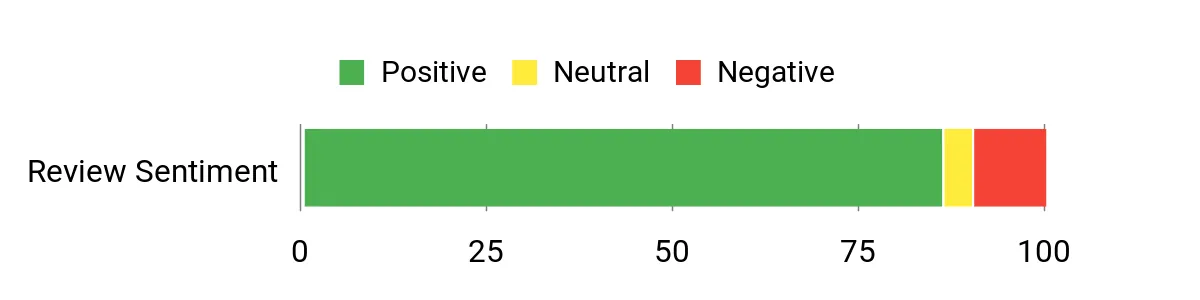
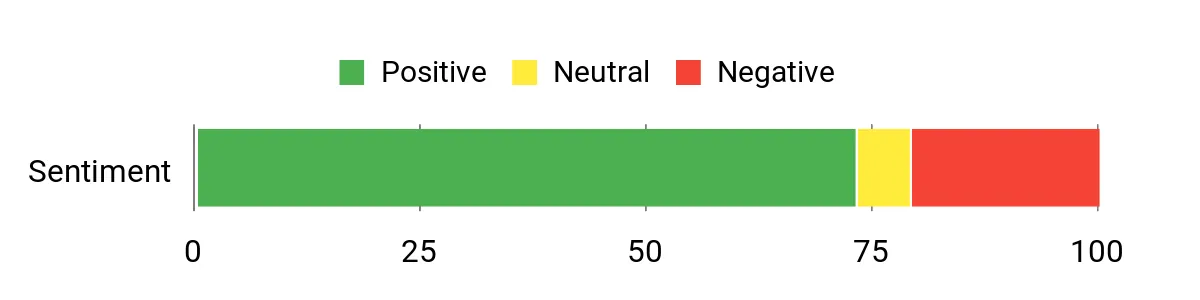
You’ll see reviews that consistently praise the X55 for filling dead zones and making streaming and video calls more reliable. People often mention how easy the Deco app makes setup and how the system keeps dozens of devices running smoothly. A few users note occasional compatibility quirks or isolated faulty units, but most highlight the improved coverage, extra gigabit ports, and the basic HomeShield protections.
Overall Sentiment: Positive
Savings Over Time
Because the Deco X55 improves coverage and device handling, you may find you don’t need to pay for a faster ISP tier or buy multiple extenders. Better stability means fewer service headaches and less fiddling with equipment over time, so it can be a cost‑effective way to future‑proof a home network.
When It Helps Most
| Situation | How It Helps |
|---|---|
| Large or multi‑story homes | Places satellites where coverage drops and get seamless roaming so you don’t lose calls or streams moving between floors. |
| Homes with many smart devices | Wi‑Fi 6 and intelligent mesh balance traffic so cameras, speakers, phones and TVs can coexist without slowing each other down. |
| Rooms with wired access | Use Ethernet backhaul to link units for the most reliable throughput and lower wireless congestion. |
| Households that need easy setup | The Deco app walks you step‑by‑step so you can get a stable network without digging into technical settings. |
Ease of Use
| Feature | Ease Level |
|---|---|
| Initial setup via Deco app | Easy |
| Adding satellites or expanding coverage | Easy |
| Daily network management (devices, guest access) | Easy |
| Configuring Ethernet backhaul | Moderate |
| Advanced routing or mesh integration with other routers | Moderate |
Versatility
Works as a router or mesh satellite, supports wired backhaul, and plays nicely with most ISPs and many device types so you can mix smart home gear, gaming consoles, and streaming boxes without juggling networks.
Problem Solving
Good at eliminating dead zones, reducing buffering during high usage, and keeping many devices online concurrently. It won’t solve every edge‑case (like certain compatibility issues), but for typical home networking headaches it’s an effective fix.
Security Features
| Feature | Protection Level |
|---|---|
| TP‑Link HomeShield (Basic) | Good |
| Guest network and guest access controls | Moderate |
| Parental controls (content filters, schedules) | Good |
| Secure‑by‑Design pledge (CISA signatory) | High |
Key Benefits
- Wide coverage up to 6,500 sq ft with three units
- Wi‑Fi 6 performance for many simultaneous devices
- Three gigabit Ethernet ports per unit and support for wired backhaul
- Straightforward app setup and easy device management
- Built‑in HomeShield basic security and parental controls
Rating: 4.4 (total: 16713+)
🎯 Best Smart-Home Support

If you want a mesh system that just works with a busy smart home, the eero 7 is built for that sort of life. You’ll get Wi‑Fi 7 features like multi‑link operation to reduce lag and two auto‑sensing 2.5 GbE ports so you can actually make the most of faster ISP plans.
It’s designed to cover up to about 6,000 sq ft with a three‑pack and handle well over a hundred devices, so streaming, video calls and smart‑device routines stay steady. Setup is handled in the eero app and tends to be straightforward, and the platform also acts as a smart‑home hub with Thread, Zigbee and Alexa compatibility. If your home is full of smart speakers, lights and cameras, this is a practical pick that balances modern speed with easy integration.
What People Say
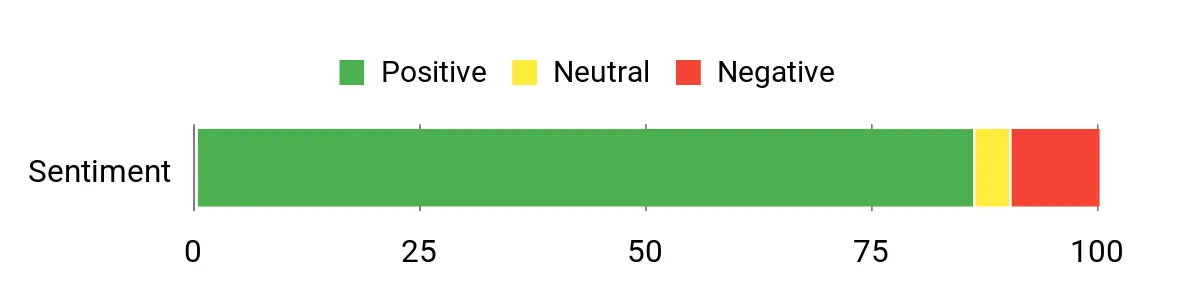
Most users praise how easy the eero app makes setup and how reliably the system fills in dead spots, especially in homes with lots of smart gadgets. People also highlight improved speeds after upgrading and consistent coverage across rooms. The recurring critiques are about a few setup hiccups (bridge mode or initial sequencing) and missing advanced QoS/device prioritization options for some power users.
Overall Sentiment: Positive
Savings Over Time
By replacing multiple extenders and keeping devices connected more efficiently, the eero 7 can reduce the need for additional hardware and make better use of faster internet plans you already pay for. Regular software updates and a multi‑year warranty also help you avoid frequent replacements.
When It Helps Most
| Situation | How It Helps |
|---|---|
| Homes with lots of smart devices | Acts as a smart‑home hub and balances traffic so cameras, lights, speakers and phones can run together without frequent drops. |
| Large or multi‑story houses | Place the nodes to extend coverage and get seamless roaming so you don’t lose calls or streams moving between rooms or floors. |
| You have a fast ISP plan | Two 2.5 GbE ports let you use higher‑speed internet without bottlenecking at the router. |
| Casual streaming and remote work | Multi‑link operation and robust mesh routing reduce buffering and keep video calls stable when multiple people are online. |
Ease of Use
| Feature | Ease Level |
|---|---|
| Initial setup via eero app | Easy |
| Adding or relocating nodes | Easy |
| Daily network management (guest access, device pause) | Easy |
| Enabling SQM or advanced traffic settings | Moderate |
| Troubleshooting device compatibility issues | Moderate |
Versatility
Works as a primary router or as part of an expanded mesh, supports Thread and Zigbee for smart‑home devices, is backward compatible with older eero units, and integrates with Alexa for voice‑controlled routines.
Problem Solving
Good at eliminating dead zones, improving throughput for faster ISP plans, and keeping many devices online at once. It won’t fix every niche compatibility issue or replace advanced QoS controls some power users want, but for most households it meaningfully reduces buffering and dropped connections.
Security Features
| Feature | Protection Level |
|---|---|
| WPA3 and WPA2 encryption | High |
| Automatic software security updates | High |
| Optional eero Plus advanced security (subscription) | Good |
| Guest network and device/profile pause | Moderate |
Key Benefits
- Wi‑Fi 7 with multi‑link operation for lower latency and better reliability
- Supports internet plans up to 2.5 Gbps with two auto‑sensing 2.5 GbE ports
- Three units cover up to 6,000 sq ft and support 120+ devices
- Acts as a smart‑home hub (Thread, Zigbee) and works with Alexa
- Straightforward app setup and ongoing software updates
- Optional eero Plus subscription adds advanced security and parental controls
Rating: 4.4 (total: 1004+)
🚀 Best Wi‑Fi 6E

If you want a future‑ready mesh system that cuts through the congestion of crowded Wi‑Fi, the Deco XE75 is worth a look. You get a true tri‑band setup with a dedicated 6 GHz band for Wi‑Fi 6E devices, AI‑driven mesh that optimizes connections between nodes, and enough coverage from a 3‑pack to handle most large homes and outdoor spaces.
In everyday life it smooths out streaming, keeps video calls stable, and makes roaming between rooms feel seamless. For special occasions — a backyard party, remote work bursts, or a big family movie night — it keeps devices from tripping over each other.
If you want solid coverage and an easier way to retire extenders without diving deep into networking, this is a practical pick.
What People Say
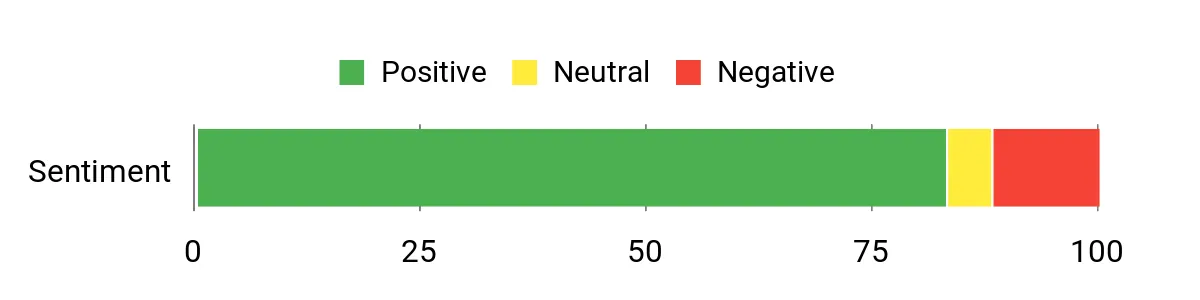
People regularly praise how the XE75 fills in dead zones and makes roaming painless, and many mention that setup through the Deco app is straightforward. Reviewers also note tangible improvements when switching to the 6 GHz band for less‑crowded throughput, while a few call out compatibility quirks with older devices or the need to tweak security settings for legacy gear.
Overall Sentiment: Positive
Savings Over Time
By consolidating routers and extenders into one mesh system you cut down on extra hardware and the hassle of juggling multiple networks. Regular firmware updates, a solid warranty, and built‑in security features also help you avoid frequent replacements or third‑party subscriptions for basic protection.
When It Helps Most
| Situation | How It Helps |
|---|---|
| Homes With Wi‑Fi 6E Devices | The 6 GHz band gives compatible devices a less congested lane, improving throughput and reducing interference from older Wi‑Fi traffic. |
| Large Or Multi‑Story Houses | Place nodes where signal drops and the mesh hands off connections smoothly so you don’t lose calls or streaming when you move between floors or rooms. |
| Outdoor Coverage (Patios/Guest Houses) | Stronger backhaul and wider overall coverage mean you can get usable signal farther from the main router, useful for backyard work or entertainment. |
| Busy Homes With Many Devices | AI mesh and tri‑band capacity help balance traffic so cameras, phones, and streaming boxes can run together without frequent buffering. |
Ease of Use
| Feature | Ease Level |
|---|---|
| Initial setup via Deco app | Easy |
| Adding or moving nodes | Easy |
| Switching to Access Point/bridge mode | Moderate |
| Managing HomeShield security and parental controls | Moderate |
| Troubleshooting older device compatibility (WPA3/6 GHz) | Moderate |
Versatility
Works as a primary router replacement or part of a mixed network, supports using the 6 GHz band as backhaul or as a client network, and is compatible with most ISPs, so you can mix wired and wireless setups to suit your home.
Problem Solving
Very good at eliminating dead zones, reducing congestion on crowded bands, and keeping many devices connected at once. It won’t change your ISP‑delivered speeds or make non‑compatible legacy devices suddenly support Wi‑Fi 6E, but it does a strong job smoothing everyday connectivity.
Security Features
| Feature | Protection Level |
|---|---|
| WPA3 and WPA2 support | High |
| TP‑Link HomeShield (basic features included) | Good |
| Automatic firmware updates | High |
| Guest network and parental controls | Moderate |
Key Benefits
- True tri‑band with a 6 GHz channel to reduce interference and serve Wi‑Fi 6E devices
- Covers up to 7,200 sq. ft with a three‑pack, reducing dead zones across large homes
- AI‑driven mesh optimizes node backhaul and device connections for smoother roaming
- Handles many devices simultaneously — specs aimed at up to ~200 clients
- Deco app offers guided setup and everyday management from your phone
- TP‑Link HomeShield provides built‑in network and IoT protection with basic features
Rating: 4.3 (total: 8083+)
💰 Best Value Wi‑Fi 7

If you want a mesh setup that feels like an easy upgrade rather than a tech project, this is a solid pick. You get Wi‑Fi 7 speed and Multi‑Link Operation (MLO) that helps keep streams and game sessions steady, plus two 2.5 Gbps ports on every unit if you need multi‑gig wired devices or a wired backhaul.
In everyday use it smooths out streaming, keeps video calls from dropping, and makes roaming between rooms painless. For special occasions — a backyard get‑together, a movie night, or heavy remote‑work days — it keeps a lot of devices playing nice at once.
If you value wide coverage and modern features without getting into complicated setups, the Deco BE25 gives you that balance.
What People Say
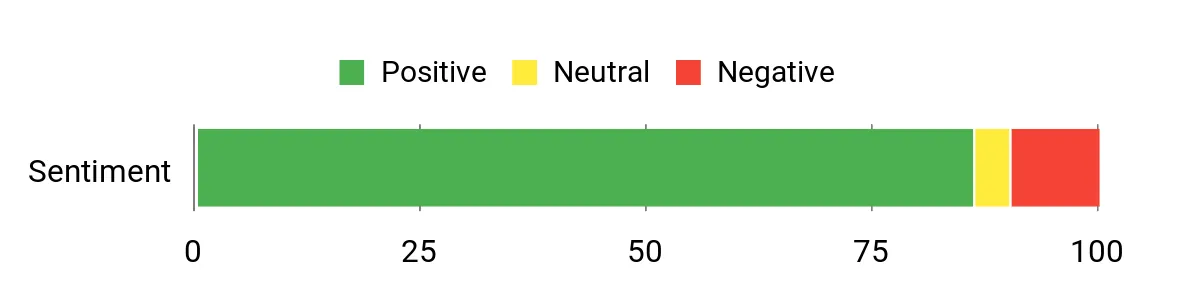
You’ll see a lot of reviews noting big improvements in coverage and fewer dead zones after switching to this mesh. Most people also say the Deco app makes setup painless and that the system handles many simultaneous devices without obvious slowdowns.
A smaller group mentions an occasional faulty unit or compatibility quirk with some older gear, but the common theme is reliable speed and easier home networking.
Overall Sentiment: Positive
Savings Over Time
Replacing a tangle of extenders and older routers with one mesh system cuts down on extra hardware, power draw, and the need to babysit multiple networks. Regular firmware updates and built‑in security features also reduce the odds you’ll need frequent replacements or add third‑party subscriptions for basic protection.
When It Helps Most
| Situation | How It Helps |
|---|---|
| Homes With Wi‑Fi 7 Devices | MLO and the BE5000 chipset let newer devices get better throughput and lower latency where supported, so you see real gains with modern phones, laptops, and consoles. |
| Large Or Multi‑Story Houses | Place the three nodes to eliminate dead spots and the mesh hands off connections so streaming, calls, and gaming don’t drop when you move between floors. |
| Multi‑Gig Wired Setups | Dual 2.5 Gbps ports on each unit let you attach fast wired devices or run a wired backhaul for steadier node links. |
| Busy Smart‑Home Environments | HomeShield and the system’s device handling help keep cameras, speakers, and phones from fighting for bandwidth during peak use. |
Ease of Use
| Feature | Ease Level |
|---|---|
| Initial setup via Deco app | Easy |
| Adding or relocating nodes | Easy |
| Enabling wired backhaul or multi‑gig LAN | Moderate |
| Configuring VPN client/server | Moderate |
| Troubleshooting older device compatibility | Moderate |
Versatility
Acts as a full router replacement or part of a larger Deco network, supports wired and wireless backhaul, and works with a wide range of ISPs and client devices so you can adapt it to different home setups.
Problem Solving
Very good at eliminating dead zones, balancing many devices, and providing multi‑gig wired options; it won’t increase the raw speed your ISP delivers, and a few legacy devices may need tweaks, but it smooths everyday connectivity for most households.
Security Features
| Feature | Protection Level |
|---|---|
| TP‑Link HomeShield (Basic included) | Good |
| WPA3 and WPA2 support | High |
| Automatic firmware updates | High |
| VPN client and server support | Good |
| Guest network and parental controls | Moderate |
Key Benefits
- Wi‑Fi 7 dual‑band performance with MLO for better multi‑device handling
- Covers up to 6,600 sq. ft from a 3‑pack, reducing dead zones across most homes
- Two 2.5 Gbps WAN/LAN ports per unit for multi‑gig wired devices or backhaul
- AI‑Roaming keeps connections smooth as you move through the house
- TP‑Link HomeShield offers basic network and IoT protection out of the box
- Built‑in VPN client/server support for added privacy on the network
Rating: 4.4 (total: 16713+)
⭐ Best For Power Users

If you want a mesh system that actually keeps up with a busy modern home, this is one to consider. You get Wi‑Fi 7 speeds across tri‑band radios, a lot of wired flexibility with four 2.5 Gbps ports and a USB 3.0 port, and the Deco app makes setup and everyday management straightforward.
In daily life it smooths out streaming, keeps video calls stable, and lets multiple gamers, smart devices, and people stream at once without constant buffering. For special occasions — backyard parties, a work‑from‑home marathon, or a big family movie night — it holds the network together when lots of devices are fighting for attention.
If you’re the sort who wants multi‑gig options and real coverage without wrestling with dozens of extenders, the Deco BE63 is built for that.
What People Say
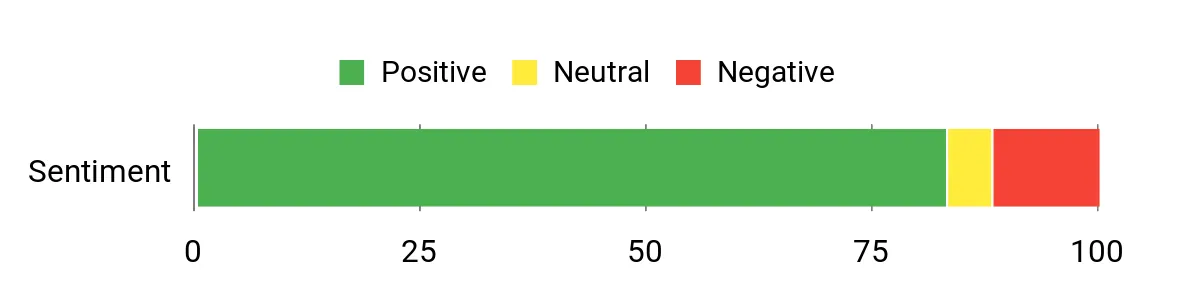
Customers commonly highlight big improvements in coverage and reliability after switching to this Deco — dead zones tend to disappear and roaming between rooms gets a lot smoother. The Deco app and straightforward setup show up in a lot of reviews as making initial configuration painless, and power users appreciate the multi‑gig ports and VPN options. Some owners note occasional compatibility quirks with older devices or that Wi‑Fi 7 visibility depends on client hardware, but overall people praise the speed and flexibility.
Overall Sentiment: Positive
Savings Over Time
Swapping multiple routers and extenders for one mesh system cuts clutter, reduces power draw, and means you maintain fewer devices long term. Built‑in security, regular firmware updates, and home‑network features reduce the need for extra subscriptions or frequent hardware replacements, which helps keep ongoing costs lower.
When It Helps Most
| Situation | How It Helps |
|---|---|
| Large Or Multi‑Story Homes | Place the nodes across floors and wings to eliminate dead spots and keep streaming and calls stable as you move through the house. |
| Multi‑Gig Wired Setups | Multiple 2.5 Gbps ports let you attach fast NAS, gaming PCs, or use wired backhaul for the most reliable node links. |
| Busy Smart‑Home Environments | Handles hundreds of connected devices and isolates IoT traffic with guest networks and HomeShield features so critical devices stay responsive. |
| High‑Demand Streaming & Gaming | Tri‑band radios and MLO help keep streams and gaming sessions smooth by distributing traffic and reducing contention. |
Ease of Use
| Feature | Ease Level |
|---|---|
| Initial setup via Deco app | Easy |
| Switching to Access Point mode | Easy |
| Adding or relocating nodes | Easy |
| Enabling wired backhaul or multi‑gig LAN | Moderate |
| Configuring VPN client/server | Moderate |
Versatility
Works as a full router replacement or as part of a larger Deco mesh, supports both wireless and wired backhaul, integrates with Alexa/Google Assistant and plays nicely with different ISPs so you can adapt it to a range of home setups.
Problem Solving
Very good at removing dead zones, managing many simultaneous devices, and offering multi‑gig wired options; it won’t boost the top speed your ISP provides, and a handful of legacy devices may need configuration tweaks, but it smooths everyday connectivity for most power users.
Security Features
| Feature | Protection Level |
|---|---|
| TP‑Link HomeShield (Basic included) | Good |
| WPA3 and WPA2 support | High |
| Automatic firmware updates | High |
| VPN client and server support | Good |
| Guest network and parental controls | Moderate |
Key Benefits
- Tri‑band Wi‑Fi 7 with Multi‑Link Operation for better throughput and lower latency
- Covers up to 7,600 sq. ft from a 3‑pack, cutting down on dead zones
- Four 2.5 Gbps WAN/LAN ports plus USB 3.0 for multi‑gig wired devices or wired backhaul
- Handles around 200 connected devices so smart homes stay responsive
- TP‑Link HomeShield provides built‑in network protection and parental controls
- Supports VPN client/server for added network privacy and flexibility
Rating: 4.3 (total: 8083+)
🔰 Best For Small Homes

If you live in a smaller home or apartment and want reliable Wi‑Fi without a lot of fuss, this is a really practical choice. You get Wi‑Fi 6 performance that can handle a household of phones, TVs, smart speakers, and a few gaming sessions while covering roughly 1,500 sq.
ft. Setup is driven by the eero app, so you can get it running in minutes and manage the network from your phone. The built‑in Thread and Zigbee hub is a nice bonus if you’re slowly building a smart home — it can replace a separate hub for compatible devices. For everyday use it smooths out streaming and video calls, and for busier days — think movie nights or a work‑from‑home deadline — it keeps multiple people from stepping on each other’s bandwidth.
If your home is compact and you want a low‑maintenance mesh that still plays nice with smart devices, the eero 6+ is worth considering.
What People Say
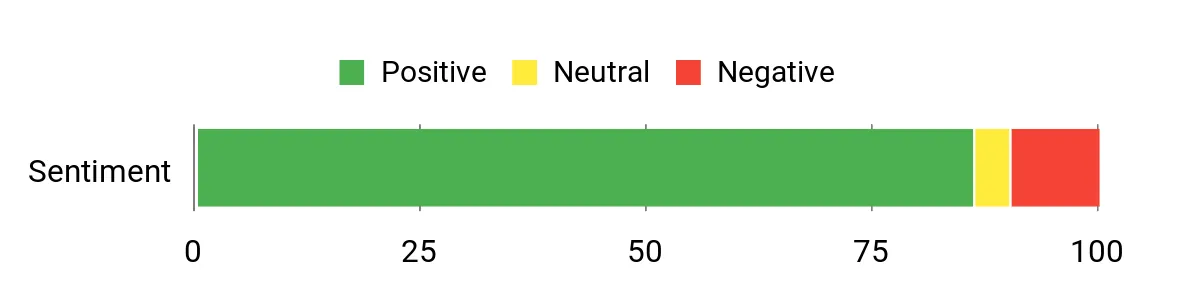
Reviewers commonly notice a big improvement in coverage and fewer dead zones after switching to eero 6+. People praise how quick and painless the app setup is, the steady performance with many connected devices, and the convenience of the built‑in smart home hub. Some owners mention limits like only two Ethernet ports per unit and optional subscription features, but most are happy with the day‑to‑day reliability.
Overall Sentiment: Positive
Savings Over Time
Consolidating a couple of routers or extenders into one mesh node cuts down on clutter and power draw, and automatic updates reduce the need for frequent manual maintenance. The built‑in smart‑home hub can save you from buying a separate hub for Thread/Zigbee devices, though a paid security subscription adds optional ongoing cost.
When It Helps Most
| Situation | How It Helps |
|---|---|
| Small Homes and Apartments | Provides solid coverage for a single floor or compact layout so you won’t need multiple bulky access points. |
| Households With Many Devices | Wi‑Fi 6 and eero’s traffic routing help keep phones, streaming boxes, and smart devices responsive when several are active. |
| Smart‑Home Beginners | Built‑in Thread and Zigbee support means you can add compatible sensors and bulbs without buying a separate hub. |
| Quick Setup Needs | The guided app makes initial setup and adding extra nodes straightforward, so you can get working internet fast. |
Ease of Use
| Feature | Ease Level |
|---|---|
| Initial setup via eero app | Easy |
| Adding or relocating nodes | Easy |
| Managing network remotely | Easy |
| Switching to bridge/access point mode | Moderate |
| Advanced troubleshooting (MoCA, mixed networks) | Moderate |
Versatility
You can use a single eero 6+ as a gateway router or add it to an existing eero mesh. It works with Alexa and supports Thread/Zigbee devices, so it fits both casual setups and gradually expanding smart homes. Mixing very old eero units is possible but can limit peak performance.
Problem Solving
Very good at smoothing out dead zones in small to medium layouts and handling lots of everyday devices. It won’t magically increase the top speed your ISP provides, and the limited wired ports per unit mean heavy wired deployments may need a switch, but it solves most household connectivity headaches.
Security Features
| Feature | Protection Level |
|---|---|
| Automatic firmware updates | High |
| WPA3 and WPA2 support | High |
| Cloud‑managed security with optional eero Secure | Good |
| Guest network and basic parental controls | Moderate |
Key Benefits
- Supports ISP plans up to a gigabit for fast home internet
- Covers up to 1,500 sq. ft., good for small homes and apartments
- Wi‑Fi 6 with 160 MHz support for better concurrent device performance
- Built‑in Thread and Zigbee hub for compatible smart home devices
- Simple, app‑guided setup and remote network management
- Automatic firmware updates and cloud management for hands‑off maintenance
Rating: 4.4 (total: 9912+)
🏆 Best Premium Mesh

If you want a no-nonsense, high-performance mesh that can handle a busy household and futureproof your setup, the eero Pro 7 is a solid pick. You get Wi‑Fi 7 speeds with tri‑band radios, two auto‑sensing 5 GbE ports, and coverage for large homes — it’s built to keep streaming, gaming, and video calls smooth across multiple floors. Daily use feels worry‑free: the app walks you through setup, nodes roam devices seamlessly, and the system quietly manages connections so you don’t have to babysit it.
For occasions when the house is full — a movie night, remote work day, or a multiplayer gaming session — it keeps latency low and more devices online without hiccups. If you care about top-tier stability and easy management, you’ll find this one worth considering.
What People Say
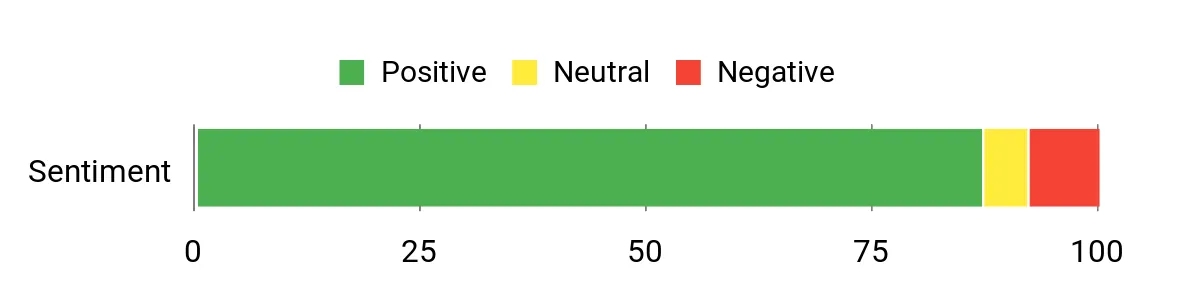
You’ll notice customers repeatedly call out better real‑world speeds and far fewer dead zones after switching to the Pro 7. People appreciate how quick the app setup is, the steady performance under heavy device loads, and the improved roaming between nodes.
A handful mention occasional quirks with bundled VPN features or minor software bugs, but most highlight stability, coverage, and easier device management as the main wins.
Overall Sentiment: Positive
Savings Over Time
Consolidating coverage with a powerful mesh reduces the need for multiple extenders or extra hardware, which cuts power use and ongoing maintenance. The system’s firmware updates and robust feature set mean you’re less likely to replace gear soon, though optional subscription services add extra ongoing features if you choose them.
When It Helps Most
| Situation | How It Helps |
|---|---|
| Large Homes and Multi‑Floor Layouts | Extensive coverage from a 3‑pack and strong roaming reduce dead zones across levels, so devices stay connected as you move around. |
| Homes With Many Connected Devices | Tri‑band Wi‑Fi 7 and eero’s routing keep streams, cameras, phones, and game consoles performing smoothly when a lot is online. |
| High‑Bandwidth Activities | Support for up to 5 Gbps plans and 5 GbE ports lets you actually use fast internet for cloud backups, 4K/8K streaming, and competitive gaming. |
| Smart Home Integrations | Built‑in Thread, Zigbee controller support, and Alexa compatibility make it easier to manage smart devices without extra hubs. |
Ease of Use
| Feature | Ease Level |
|---|---|
| Initial setup via eero app | Easy |
| Adding or relocating nodes | Easy |
| Monitoring network and devices | Easy |
| Configuring advanced settings (VLANs, port forwarding) | Moderate |
| Troubleshooting unusual device compatibility issues | Moderate |
Versatility
You can run a single eero Pro 7 as your main gateway or pair several for wide coverage; it plays nicely with older eero units and smart home ecosystems. The mix of strong wireless radios, wired 5 GbE options, and hub capabilities makes it suitable for homes that need both wireless reach and occasional high‑speed wired connections.
Problem Solving
Very effective at eliminating dead zones, stabilizing connections across many devices, and delivering usable ISP speeds around the house. It won’t change your ISP plan limits, and heavily wired enterprise setups may still need switches, but for home and small business use it solves most common connectivity headaches.
Security Features
| Feature | Protection Level |
|---|---|
| WPA3 and WPA2 wireless encryption | High |
| Automatic software and security updates | High |
| Optional eero Secure subscription (advanced threat protection, ad blocking, parental controls) | Good |
| Guest network and device/profile pause | Moderate |
Key Benefits
- Supports internet plans up to 5 Gbps and wireless speeds up to 3.9 Gbps
- Covers up to 6,000 sq. ft. with a 3‑pack and supports 600+ devices
- Tri‑band Wi‑Fi 7 with multi‑link operation for lower latency and better throughput
- Two auto‑sensing 5 GbE ports for high‑speed wired devices or uplink
- Backward compatible with previous eero generations and works with select Echo devices
- Patented TrueMesh software helps keep connections stable across rooms
Rating: 4.5 (total: 734+)
💼 Best For Wide Coverage

If you need blanket Wi‑Fi that just works, the Orbi 370 is aimed at making your life easier. You get Wi‑Fi 7 speeds that handle multiple 4K streams, video calls, and a bunch of smart devices at once, plus a 2.5 GbE port for faster wired gear.
Setup is app‑driven, satellites roam devices automatically, and the system is built to cover large or oddly shaped homes so you stop losing signal in corners. For everyday use it keeps the household online without constant fiddling, and for special moments — big streaming nights or remote work days with lots of video calls — it keeps things running smoothly.
If coverage and reliable real‑world performance matter more than chasing the smallest specs, this is a practical, dependable option you can count on.
What People Say
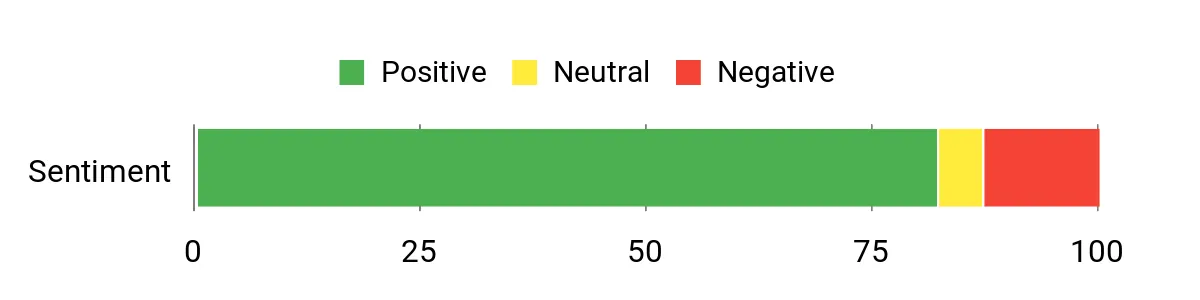
Most folks notice a big jump in coverage and more consistent speeds after switching to the Orbi 370 — dead spots tend to disappear and streaming/gaming feels smoother. People like how easy the app makes setup and how many devices the system handles, and many appreciate the added security features.
A minority report occasional satellite disconnects or issues with packaging/condition from some sellers, but overall impressions lean toward reliable performance and strong coverage.
Overall Sentiment: Positive
Savings Over Time
Replacing several cheap extenders with a single, powerful mesh system cuts down on extra gear, power draw, and maintenance. Regular firmware updates and a robust feature set mean the system should stay useful longer, though optional security subscriptions are extra if you want them.
When It Helps Most
| Situation | How It Helps |
|---|---|
| Large Homes and Multi‑Floor Layouts | Wide coverage from the 3‑pack and roaming satellites reduces dead zones across floors so devices stay connected as you move around. |
| Many Smart Devices and Cameras | Dual‑band performance and improved backhaul keep cameras, sensors, and smart plugs online without dragging down entertainment traffic. |
| Streaming and Gaming Sessions | Higher throughput and a stable mesh fabric let multiple 4K streams and gaming sessions run at once with less buffering and lower latency. |
| Hybrid Work and Video Conferencing | Consistent wireless coverage and a 2.5 GbE option give you the headroom needed for stable video calls and large file transfers. |
Ease of Use
| Feature | Ease Level |
|---|---|
| Initial setup via Orbi app | Easy |
| Adding or relocating satellites | Easy |
| Monitoring network and devices | Easy |
| Configuring advanced settings (port forwarding, QoS) | Moderate |
| Troubleshooting occasional satellite disconnects | Moderate |
Versatility
You can run the Orbi 370 as a robust gateway for a busy home, extend it with more satellites for larger footprints, or use wired 2.5 GbE links for high‑speed devices. It works with most ISPs and supports a mix of older and newer client devices, so it fits many home setups.
Problem Solving
Very effective at removing coverage gaps and delivering stable speeds across many devices. It won’t change your ISP plan limits, but for home setups that struggle with dead zones or inconsistent wireless performance, it resolves the most common headaches.
Security Features
| Feature | Protection Level |
|---|---|
| NETGEAR Armor (malware and threat protection) | High |
| Automatic firmware and security updates | High |
| Guest network and device isolation | Moderate |
| Advanced router protection features for identity and device safety | Good |
Key Benefits
- Wi‑Fi 7 throughput up to 5 Gbps for high‑bandwidth use
- Designed for whole‑home 360° coverage so you can reduce dead zones
- Dual‑band architecture with enhanced backhaul for steadier connections
- 2.5 GbE port for faster wired devices or wired backhaul options
- App‑based setup and management for straightforward installation
- Built‑in security suite (NETGEAR Armor) and automatic firmware updates
Rating: 4.3 (total: 3451+)
🎨 Best For Ease Of Use

If you’re tired of dead spots and juggling extenders, Nest Wifi Pro makes getting solid home Wi‑Fi feel effortless. You set it up through the Google Home app, place a router or two where you need coverage, and the system automatically balances traffic and prioritizes things like video calls.
For everyday life it keeps phones, laptops and streaming devices snappy; for big moments like a family streaming marathon or a workday full of video meetings, it holds up surprisingly well. It also includes self‑diagnostics and security tools so you don’t have to babysit the network. If simplicity and steady real‑world performance are what you want, this is a practical pick — just remember the 6 GHz band needs newer devices to take full advantage.
What People Say
Most buyers appreciate how easy the Google Home app makes setup and how reliably the system handles streaming and daily browsing. People often call out steady speeds across rooms, improved range compared with older Google/Nest units, and helpful automatic fixes.
A smaller group notes issues in very large or tricky houses, and some mention device compatibility quirks with certain phones or the 1 Gb WAN limit.
Overall Sentiment: Positive
Savings Over Time
Using a single mesh system like this can replace multiple extenders and old routers, cutting down on extra devices, power use, and the hassle of managing different networks. Regular firmware updates and Google’s ongoing improvements mean the system stays useful longer, though premium security services (if you choose them) are an extra cost.
When It Helps Most
| Situation | How It Helps |
|---|---|
| Small to Medium Homes | A 2–3 pack offers blanket coverage so you’ll likely eliminate most dead zones without complex wiring. |
| Multiple 4K Streams and Family Use | Tri‑band design and traffic prioritization keep streaming and video calls smooth when everyone is online. |
| Busy Smart‑Home Setups | Good device visibility and stable connections help cameras and sensors stay online without interrupting entertainment traffic. |
| Remote Work and Video Conferencing | Automatic prioritization and consistent coverage reduce dropped calls and buffering during important meetings. |
Ease of Use
| Feature | Ease Level |
|---|---|
| Initial setup via Google Home app | Easy |
| Adding or relocating nodes | Easy |
| Monitoring devices and pausing access | Easy |
| Configuring advanced network settings | Moderate |
| Troubleshooting device compatibility (older phones/devices) | Moderate |
Versatility
Nest Wifi Pro works well as a simple, scalable mesh for most homes — you can add nodes where you need coverage, use it as a primary gateway, and it supports a wide mix of devices. Note that full 6 GHz benefits require newer client hardware and it’s not backward compatible with older Google Wifi/Nest Wifi generations.
Problem Solving
Very good at smoothing over weak spots and giving consistent speeds around the house. It won’t change your ISP plan or raise the wired WAN limit, but for common home Wi‑Fi headaches — buffering, dropped connections, and unpredictable coverage — it fixes the usual culprits.
Security Features
| Feature | Protection Level |
|---|---|
| Secure boot and automatic firmware updates | High |
| Network visibility with device pause and guest network | Moderate |
| Built‑in monitoring and automatic issue diagnosis | Moderate |
| Modern encryption standards (WPA3 where supported) | Good |
Key Benefits
- Wi‑Fi 6E tri‑band support for less congestion when you have compatible devices
- Scaleable mesh coverage — one router covers up to ~2,200 sq ft and packs grow to cover larger homes
- Auto‑optimization and built‑in diagnostics reduce manual tinkering
- Clear device visibility with the ability to pause unknown devices and create a guest network
- Secure boot and automatic firmware updates help keep the system protected
Rating: 4.0 (total: 2218+)
🎯 Best Smart-Home Support

If you want a mesh that plays nicely with a busy smart home, the eero 7 is designed for exactly that. You set it up with the eero app, tuck the units where you need coverage, and it quietly balances connections so phones, cameras and streaming boxes stay online.
It supports internet plans up to 2.5 Gbps, uses Wi‑Fi 7 features like multi-link operation for better real‑world speeds, and even doubles as a smart‑home hub (Thread and Zigbee support). For day‑to‑day use it keeps video calls and streaming stable; for big moments like a family movie night or lots of devices joining at once, it usually holds up without fuss. There are a couple of setup quirks to watch for (bridge mode and a few device compatibility notes), but if you live in a connected home this is an easy, future‑focused choice.
What People Say
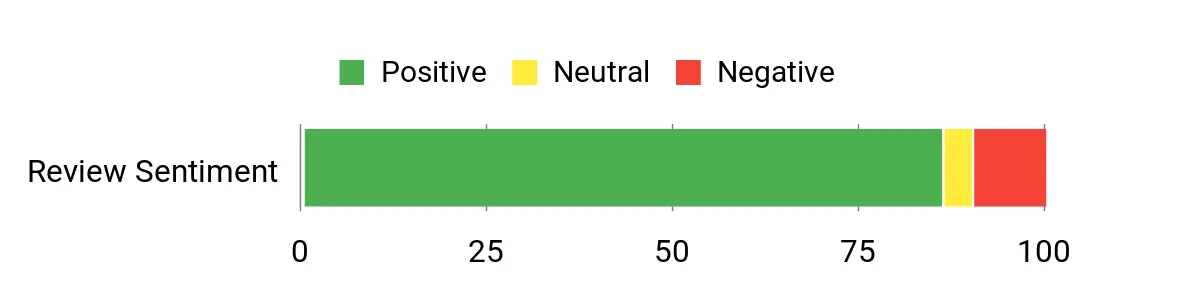
Buyers frequently call out how easy the eero app makes setup and how much better coverage and speed feel compared with older gear. People like the smart‑home hub features and the fact it handles lots of devices without getting easily overwhelmed. A recurring theme is that setup is usually simple but you might need an extra step (like putting your modem in bridge mode) and a few users mention occasional compatibility quirks or missing advanced QoS controls.
Overall Sentiment: Positive
Savings Over Time
A modern mesh like this can replace multiple extenders and old routers, cutting down on extra hardware and power draw. Wi‑Fi 7 compatibility and regular firmware updates help keep the system useful for several years, so you’re less likely to need a full replacement soon—though optional security or premium services are additional subscriptions.
When It Helps Most
| Situation | How It Helps |
|---|---|
| High‑speed internet plans (1–2.5 Gbps) | Two 2.5 GbE ports and Wi‑Fi 7 support let you take advantage of faster ISP speeds without bottlenecking wireless devices. |
| Smart‑home heavy households | Thread, Zigbee and Alexa support mean you can run sensors, lights and hubs directly through the mesh, cutting down on extra bridges. |
| Homes with many devices | Designed to handle 120+ devices, so cameras, phones, tablets and streaming boxes can coexist with fewer dropouts. |
| Open plan or multi‑floor homes | A 2‑pack covers up to about 4,000 sq ft, and TrueMesh with band steering helps reduce dead zones between units. |
Ease of Use
| Feature | Ease Level |
|---|---|
| Initial setup via eero app | Easy |
| Adding or relocating nodes | Easy |
| Managing devices and guest access | Easy |
| Configuring advanced features (SQM, bridge mode) | Moderate |
| Troubleshooting device compatibility | Moderate |
Versatility
The eero 7 works both as a straightforward mesh for everyday browsing and streaming and as a smart‑home hub for devices that use Thread or Zigbee. It supports a wide mix of client devices and can be expanded with additional eero units; the main limits are advanced network tuning features—some power users may miss deeper QoS controls.
Problem Solving
Very good at fixing typical home Wi‑Fi problems like dead spots, flaky streaming, and overloaded routers. It won’t change your ISP’s wired limit, but it smooths out wireless handoffs and keeps many devices online reliably.
For unusually complex networks or very specific QoS needs you might need extra configuration or different gear.
Security Features
| Feature | Protection Level |
|---|---|
| WPA3 and WPA2 wireless encryption | High |
| Automatic firmware and security updates | High |
| Optional eero Plus subscription (ad blocking, malware protection, VPN) | High (with subscription) |
| Device pause and guest network controls | Moderate |
Key Benefits
- Wi‑Fi 7 dual‑band performance with multi‑link operation for smoother real‑world speeds
- Supports internet plans up to 2.5 Gbps and two auto‑sensing 2.5 GbE ports
- Covers up to 4,000 sq ft with a 2‑pack and supports 120+ devices—good for dense homes
- Built‑in Thread and Zigbee plus Alexa compatibility makes it a convenient smart‑home hub
- TrueMesh software and automatic band steering help reduce dead spots and handoffs
Rating: 4.4 (total: 1004+)
💼 Best For Wide Coverage
Think of this as the kit you bring in when coverage matters more than anything else. You set up the router and two satellites with the Orbi app, place the nodes where you need signal, and the system fills gaps so streaming, video calls and gaming stay solid across large homes. It leans on Wi‑Fi 7 for higher throughput and offers a 2.5 Gb internet port and wired backhaul options if you want wired reliability.
For everyday use it keeps multiple 4K streams and smart devices humming; for big gatherings or bandwidth‑heavy tasks it usually prevents the usual buffering and dropouts. If you want a straightforward way to cover a lot of square footage without juggling extra extenders, this is a strong choice.
What People Say
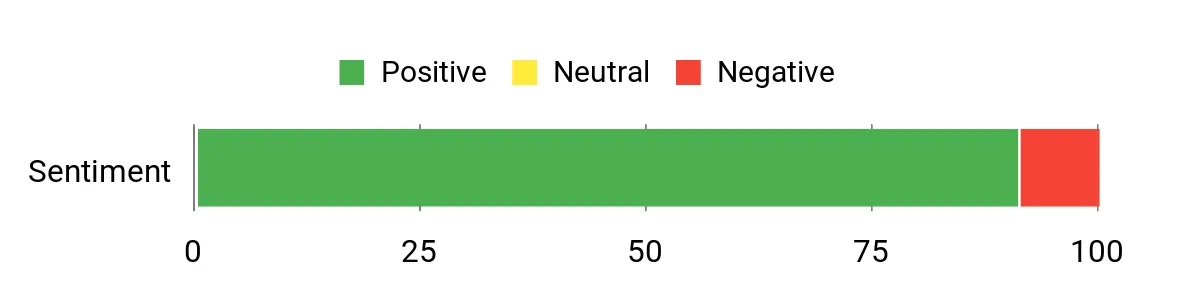
Customers commonly highlight how much better coverage and speed feel after switching to this Orbi kit, especially in larger houses with dead spots. Many point to easy setup for the basics and praise the reliable streaming and improved device connectivity; a smaller group mentions occasional app annoyances on some Android devices and prefers the web interface for advanced tweaks.
The multi‑gig port and built‑in security features also get regular nods as useful extras.
Overall Sentiment: Positive
Savings Over Time
You can retire older extenders and a clunky router setup, which simplifies power and maintenance. Wi‑Fi 7 compatibility and regular firmware updates mean the system should stay useful longer, lowering the chance you’ll replace hardware soon—though optional security subscriptions or extra services are additional costs to consider.
When It Helps Most
| Situation | How It Helps |
|---|---|
| Large homes and dead spots | Three units and wide 360° coverage close gaps so rooms and floors that used to struggle get consistent signal. |
| Multiple simultaneous 4K streams or video calls | High throughput and dual‑band backhaul keep streams from competing for bandwidth and reduce buffering. |
| Homes with many smart devices | Stable mesh handoffs and broad device support let cameras, speakers and sensors stay connected without frequent drops. |
| Fast ISP plans and wired setups | The 2.5 Gb port and wired backhaul option let you unlock higher ISP speeds and use wired links to stabilize key nodes. |
Ease of Use
| Feature | Ease Level |
|---|---|
| Initial setup via Orbi app | Easy |
| Adding or relocating satellites | Easy |
| Managing guest network and basic settings | Easy |
| Using the web interface for advanced settings | Moderate |
| Dealing with occasional Android app issues | Moderate |
Versatility
This kit is flexible enough for everyday browsing, heavy streaming, gaming and smart‑home devices, and it supports wired multi‑gig connections if you want more stability. It works with most ISPs and can be expanded with extra Orbi nodes, though some advanced network tuning lives in the web UI rather than the app.
Problem Solving
Very capable at eliminating dead zones, smoothing out streaming and distributing connections across many devices. It won’t increase the raw speed your ISP provides, but the mesh and backhaul options stop internal network bottlenecks and make performance feel noticeably better across the house.
Security Features
| Feature | Protection Level |
|---|---|
| Automatic firmware and security updates | High |
| NETGEAR Armor (trial available) for malware and intrusion protection | High (with subscription) |
| Advanced Router Protection built in | High |
| Guest network and device controls | Moderate |
Key Benefits
- Up to 5 Gbps Wi‑Fi 7 performance for faster real‑world throughput
- 360° coverage with high‑performance antennas to reduce dead spots
- Dual‑band design with enhanced backhaul for stable multi‑device use
- 2.5 Gb internet port and wired backhaul option for multi‑gig plans
- Built‑in security features with automatic firmware updates and optional advanced protection
Rating: 4.6 (total: 34+)
💼 Best For Wide Coverage

Think of the Orbi 970 as the system you bring in when you want Wi‑Fi that just disappears into the background and keeps everything working. You set up the router and two satellites with the Orbi app, place the nodes where you need coverage, and the mesh fills dead zones so streaming, video calls and gaming stay smooth across large or oddly shaped homes. It leans on Wi‑Fi 7 and a quad‑band backhaul so multiple high‑bandwidth tasks can run at once, and it has plenty of wired ports if you want to hook up consoles or a NAS. For everyday use it makes juggling dozens of smart devices simpler; for big gatherings or work‑from‑home days it helps prevent the usual buffering or slowdown.
If you care about modern speeds and whole‑home reach, this is a sensible, future‑ready pick.
What People Say
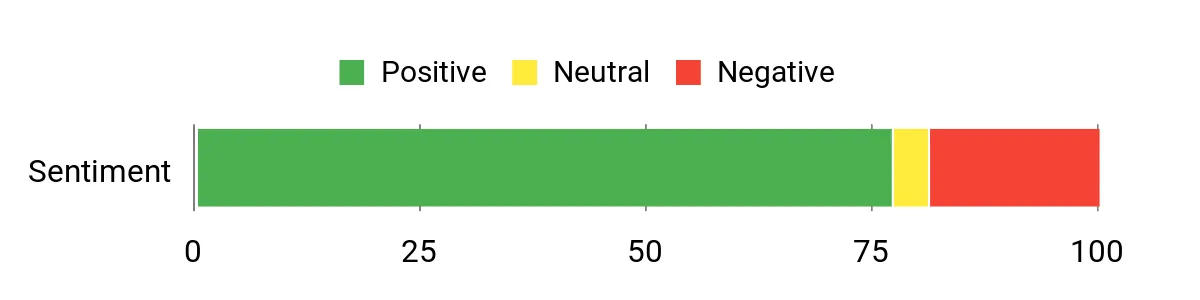
People generally praise how much faster and more consistent their home networks feel after switching to the Orbi 970—coverage and multi‑device performance are frequent highlights. Many reviewers note the setup is straightforward and that wired ports are a nice bonus, while a recurring gripe is occasional app glitches, firmware hiccups or prompts for paid subscriptions.
Overall Sentiment: Positive
Savings Over Time
Because this is a high‑performance mesh with Wi‑Fi 7 support, you’re less likely to need a replacement for several years compared with cheaper routers. You can also retire multiple small extenders and simplify maintenance. Keep in mind that optional security or advanced features behind subscriptions will add ongoing costs if you choose them.
When It Helps Most
| Situation | How It Helps |
|---|---|
| Large homes with multiple floors | Three powerful units and wide 360° coverage reach rooms and floors that usually struggle with signal, cutting down dead zones. |
| Households with heavy streaming and gaming | High aggregate throughput and dedicated backhaul keep simultaneous 4K/8K streams and gaming sessions from fighting for bandwidth. |
| Homes with many smart devices | Robust mesh handoffs and extra capacity let cameras, sensors and speakers stay connected without frequent drops. |
| Setups that need wired reliability | 10Gb and multi 2.5Gb Ethernet ports provide fast wired links for consoles, backups and wired backhaul to stabilize key nodes. |
Ease of Use
| Feature | Ease Level |
|---|---|
| Initial setup via Orbi app | Easy |
| Adding or relocating satellites | Easy |
| Managing guest network and basic settings | Easy |
| Using the web interface for advanced settings | Moderate |
| Dealing with app notifications and subscription prompts | Moderate |
Versatility
This 3‑pack is flexible enough for everyday browsing, heavy streaming, gaming and large smart‑home setups, and it supports wired multi‑gig connections when you need extra stability. It works with most ISPs and can be expanded with additional Orbi nodes, though deeper tuning lives in the web UI.
Problem Solving
Very capable at eliminating dead zones and keeping many devices running smoothly at once. While it won’t raise the raw speed from your ISP, it reduces internal bottlenecks with dedicated backhaul and strong throughput, making the network feel noticeably faster and more reliable across the house.
Security Features
| Feature | Protection Level |
|---|---|
| Automatic firmware and security updates | High |
| NETGEAR Armor (1‑year included) for malware and intrusion protection | High (with subscription after trial) |
| Advanced Router Protection built in | High |
| Guest network and parental controls | Moderate |
Key Benefits
- Up to 27 Gbps throughput using Wi‑Fi 7 for heavy multitasking and 8K/VR streaming
- Patented Quad‑Band design with an enhanced dedicated backhaul for stable device performance
- True whole‑home 360° coverage that reduces dead spots across multiple floors
- Lots of wired connectivity (10Gb and multi 2.5Gb ports) for consoles, NAS and wired backhaul
- Includes a 1‑year NETGEAR Armor subscription for added device and network protection
Rating: 4.1 (total: 3,789+)
⭐ Best For Power Users
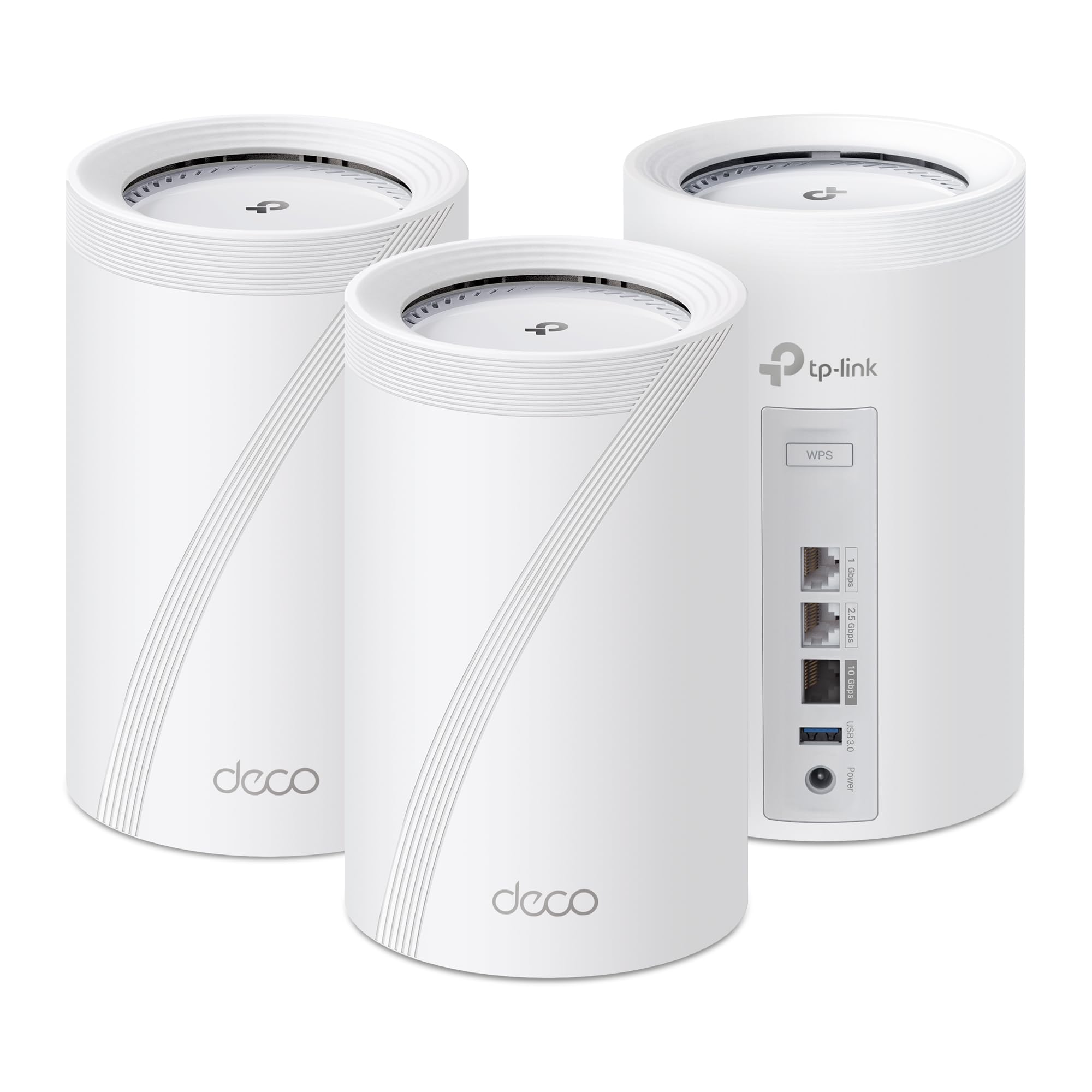
If you want a mesh that keeps up when everyone’s streaming, gaming and video‑calling at once, the Deco BE67 is a solid choice. You set it up with the Deco app, place the three nodes around the house and it stitches a single network together so devices move between nodes without you noticing.
It leans on Wi‑Fi 7 features like Multi‑Link Operation and a 6 GHz band for lower latency and higher real‑world throughput, and the multi‑gig WAN/LAN ports mean you can take advantage of faster ISP plans or wired backhaul. For everyday use it smooths out buffering and dropped calls; for busy nights or big gatherings it helps keep multiple 4K streams and gaming sessions running. If you want future‑minded performance without wrestling with complicated web panels, this is a practical pick you can rely on.
What People Say
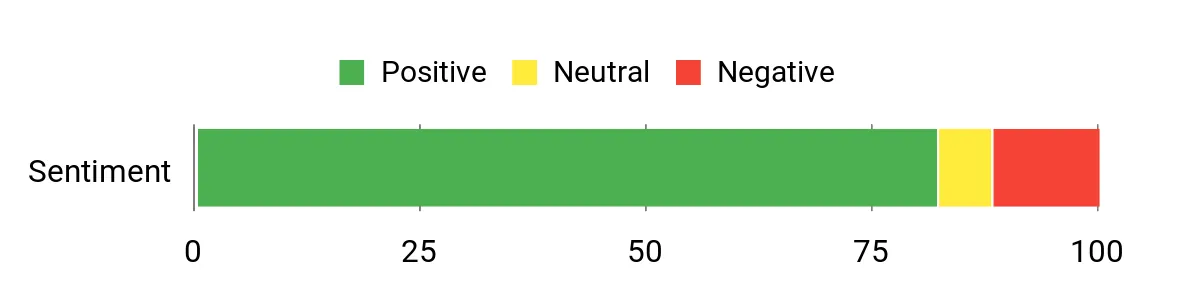
Most customers notice a clear improvement in coverage and Wi‑Fi performance after switching to the Deco BE67, especially on newer 6 GHz‑capable devices. People frequently praise the straightforward app setup, the stability when multiple devices are active, and the handy multi‑gig ports.
A smaller but recurring gripe is that configuration is app‑only (no full web UI) and a few users report intermittent connectivity or support frustrations.
Overall Sentiment: Positive
Savings Over Time
Because the BE67 supports Wi‑Fi 7 and multi‑gig wired speeds, you’re less likely to feel the need to upgrade for several years — you can retire older extenders and simplify maintenance. Optional security services and advanced features may carry subscription fees, so factor that in if you want the premium protections long term.
When It Helps Most
| Situation | How It Helps |
|---|---|
| Large homes or multi‑floor houses | Three nodes extend coverage across many rooms and floors, reducing dead spots where single routers struggle. |
| Households with many simultaneous streamers and gamers | High aggregate throughput and tri‑band design keep streams and gaming sessions from competing for bandwidth. |
| Users with multi‑gig internet or wired infrastructure | 10G and 2.5G ports let you use faster ISP plans and reliable wired backhaul for critical devices. |
| Smart‑home heavy households | High device capacity and stable mesh handoffs help cameras, locks and speakers stay connected without frequent drops. |
Ease of Use
| Feature | Ease Level |
|---|---|
| Initial setup via Deco app | Easy |
| Adding or relocating nodes | Easy |
| Managing basic settings (guest network, QoS, parental controls) | Easy |
| Advanced configuration (no full web UI) | Moderate |
| Troubleshooting and vendor support | Moderate |
Versatility
This 3‑pack works well for everyday browsing, heavy streaming, gaming and large smart‑home setups; it also supports wired multi‑gig connections for NAS or consoles and can be expanded with additional Deco units.
Problem Solving
Very effective at shrinking dead zones and keeping many devices online at once. It won’t increase your ISP’s raw speed, but it reduces internal bottlenecks and makes real‑world Wi‑Fi feel faster and more reliable across the home.
Security Features
| Feature | Protection Level |
|---|---|
| TP‑Link HomeShield (Free basic plan, paid upgrade available) | High (core protection) / Enhanced with subscription |
| VPN client and server support | Moderate |
| Secure‑by‑design commitment and firmware updates | High |
| Guest network and parental controls | Moderate |
Key Benefits
- Wi‑Fi 7 tri‑band design with up to 14 Gbps aggregate throughput for heavy multitasking
- Coverage up to about 8,100 sq. ft. and support for ~200 connected devices
- Multi‑gig wired options (10G and 2.5G) for fast WAN/LAN and wired backhaul
- AI‑Roaming and MLO for smoother handoffs and lower latency during movement
- Built‑in HomeShield security and VPN client/server support for privacy and control
Rating: 4.3 (total: 959+)
🎮 Best For Gaming

If you want a mesh that’s built around gaming but doesn’t make everyday life harder, the GT6 is a solid pick. You set the two nodes where you lose signal, run the ASUS app and the system stitches a single fast network across the house.
It leans on a dedicated high‑performance backhaul and wide 160 MHz channels so consoles, PCs and streaming TVs all get priority when they need it. For daily use it means fewer dropouts and smoother video calls; for late‑night gaming sessions the triple‑level acceleration and multi‑gig wired options help keep lag low. If you like having controls at your fingertips—QoS, device grouping and a full web UI—you’ll appreciate how much you can tune without feeling stuck.
What People Say
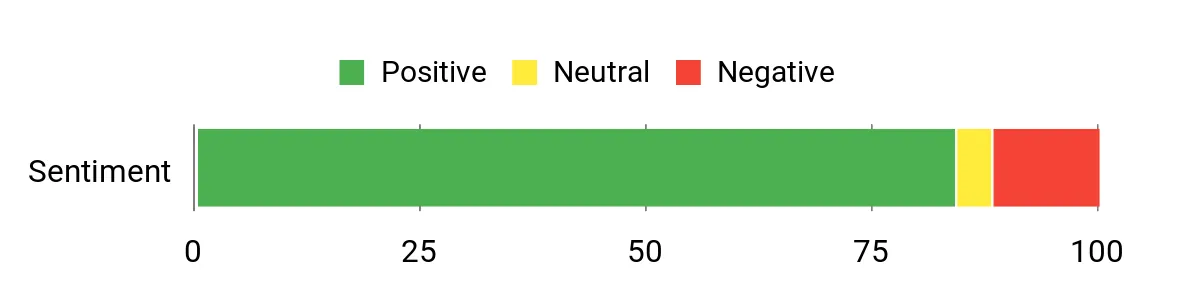
You’ll see reviewers praising the GT6 for coverage and raw performance—many report fewer dead zones and steady speeds across large homes. People also like the app plus the deeper options in the web UI, the gaming optimizations and the included lifetime security features. A smaller group calls out occasional hardware failures or warranty/support headaches, so consider where and how you buy it.
Overall Sentiment: Positive
Savings Over Time
Because the GT6 pairs powerful radios, robust backhaul and multi‑gig wired ports, you’re less likely to replace gear when your household adds more devices or faster internet. The lifetime security bundle also removes an ongoing subscription worry for basic protection. Keep in mind that long‑term value depends on getting reliable support and warranty coverage where you live.
When It Helps Most
| Situation | How It Helps |
|---|---|
| Large or multi‑floor homes | Two high‑power nodes extend a consistent signal across lots of square footage, reducing dead spots and handoff drops. |
| Competitive and online gaming | Triple‑level game acceleration and low‑latency backhaul prioritize gaming traffic so your inputs and pings stay lower. |
| Busy households with many streamers and remote workers | Tri‑band capacity and QoS prevent video calls and 4K streams from stepping on each other during peak use. |
| Homes with multi‑gig internet or wired devices | 2.5 Gbps WAN/LAN and link aggregation let you use faster ISP plans and give consoles or NAS a reliable wired path. |
Ease of Use
| Feature | Ease Level |
|---|---|
| Initial setup via ASUS Router app | Easy |
| Using the web UI for advanced tweaks | Moderate |
| Placing nodes and optimizing backhaul | Moderate |
| Enabling game acceleration and QoS | Easy |
| Troubleshooting hardware or firmware issues | Moderate |
Versatility
This system suits gamers, heavy streamers and power users who also want wired multi‑gig options; it can act as a primary router, an access point or a wired backhaul mesh node depending on your setup.
Problem Solving
Very effective at shrinking dead zones and keeping many devices online at once. It won’t make your ISP faster, but it reduces internal bottlenecks and makes high‑demand activities feel more consistent across the home.
Security Features
| Feature | Protection Level |
|---|---|
| AiProtection by Trend Micro (free lifetime) | High |
| ASUS Instant Guard for secure remote connections | Moderate |
| Guest network, parental controls and QoS | Moderate |
| Regular firmware updates and secure protocols | High |
Key Benefits
- Tri‑band Wi‑Fi 6 design with dedicated high‑performance backhaul for up to 10,000 Mbps aggregate throughput
- Coverage up to about 5,800 sq. ft. using multiple nodes and ASUS RangeBoost Plus
- 2.5 Gbps WAN and LAN aggregation for faster wired connections and console/PC priority
- Triple‑Level Game Acceleration to optimize traffic from your device to game servers
- Free lifetime AiProtection by Trend Micro and ASUS Instant Guard for built‑in network security
Rating: 4.4 (total: 3,909+)
🎨 Best For Ease Of Use

If you want a truly fuss‑free way to kill dead zones, this Google WiFi 3‑pack is built for that kind of simplicity. You place the three nodes around your home, open the Google Home app and follow the short setup steps — the system then joins them into one seamless network so devices roam without you juggling SSIDs.
For daily life it means smoother 4K streaming, fewer dropped video calls and easier Wi‑Fi for smart home gear; for special occasions like a house party or remote‑work day it keeps more devices online without constant babysitting. It’s a solid pick if you value a clean, minimal look and an app that makes management straightforward, though it’s aimed at people who prefer simplicity over deep, technical tuning.
What People Say
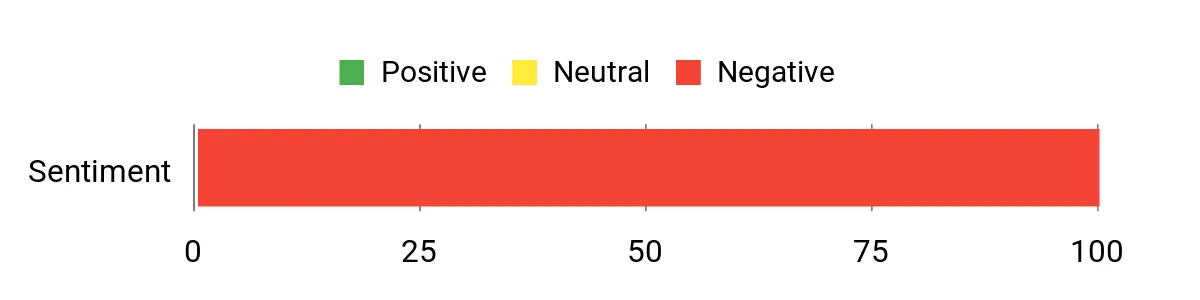
Customers commonly note the straightforward app setup and reliable coverage as big pluses — a lot of users appreciate how easy it is to manage devices and enable guest access or parental controls from their phone. On the flip side, some buyers report setup hiccups or frustration with support when things don’t go smoothly, so experiences can vary if you hit an issue during installation.
Overall Sentiment: Negative
Savings Over Time
Because a three‑node mesh reduces the need for signal extenders or extra routers, you’re less likely to chase piecemeal fixes over time. The simple management tools also cut down on time spent troubleshooting, which translates to indirect savings.
Just keep in mind that long‑term value depends on reliability and support if hardware replacement becomes necessary.
When It Helps Most
| Situation | How It Helps |
|---|---|
| Small to medium single‑family homes | Three evenly placed nodes provide continuous coverage so TVs, phones and smart speakers all stay connected around the house. |
| Busy family households | Parental controls and guest networks make it easy to limit access for kids and visitors without messing with advanced settings. |
| Phone and video‑call heavy remote work days | Stable roaming between nodes helps keep video calls from dropping when you move between rooms. |
| Homes with lots of smart devices | A single, managed mesh means your bulbs, cameras and thermostats stay on the same network and are easier to monitor from the app. |
Ease of Use
| Feature | Ease Level |
|---|---|
| Initial setup via Google Home app | Easy |
| Adding and naming devices | Easy |
| Enabling parental controls and guest networks | Easy |
| Advanced network customization (VLANs, QoS) | Limited |
| Troubleshooting persistent connection problems | Moderate |
Versatility
This set is geared toward users who want a simple, reliable home Wi‑Fi setup: streaming, smart home devices and general gaming are all covered. It’s less focused on advanced networking features or the latest Wi‑Fi standards, so power users who need deep tuning or multi‑gig wired options may find it limited.
Problem Solving
Very effective at eliminating dead zones and simplifying network management across a typical home. It won’t increase your ISP’s top speed, but it smooths roaming and reduces the need for extra extenders or repeaters.
Security Features
| Feature | Protection Level |
|---|---|
| Guest network capability | Moderate |
| Parental controls and device management | Moderate |
| Automatic security updates and app monitoring | Moderate |
Key Benefits
- Complete three‑node mesh in one box to cover up to about 4,500 sq. ft.
- Dual‑band AC1200 performance for steady streaming and everyday gaming
- Easy setup and device management through the Google Home app
- Built‑in parental controls and guest network options for simple family sharing
- Modern, unobtrusive design that blends into most rooms
Rating: 1.0 (total: 1+)
FAQ
How Do I Choose The Right Mesh Wi‑Fi System For My Home?
You choose a mesh system by matching its capabilities to your home layout, device load and internet service. Prioritize coverage based on your floor plan and construction; a 2,500 sq. ft. open plan will need fewer nodes than a 4,000 sq.
ft. home with multiple floors and thick walls.
Match the system’s throughput to your ISP plan so the mesh can deliver your subscribed speed, and consider whether you need Wi‑Fi 6, 6E or 7 for future devices. Check for Ethernet Backhaul support and the number of gigabit ports per unit if you plan to wire satellites for maximum stability.
Evaluate software features you’ll use — band steering, QoS/device prioritization, parental controls, guest network and automatic security updates — and buy from a vendor with solid support and warranty so you get help when you need it. Finally, confirm device compatibility for older IoT gadgets (2.4 GHz) and avoid assuming the latest standard is required if your devices won’t use it.
How Do I Install And Optimize A Mesh Network For Best Coverage And Performance?
You install and optimize a mesh network by placing the primary node close to the modem, spacing satellites roughly one or two rooms apart and keeping them out in the open away from dense obstructions and electronic interference. Use the vendor app to guide placement and run speed tests from typical device locations; if coverage gaps persist, add a node or use a wired backhaul. If your ISP gateway is also a router, enable Bridge Mode or set the mesh to Access Point mode to avoid double NAT and routing conflicts. Update firmware before full deployment, enable band steering so devices automatically pick the best radio, create a separate guest or IoT SSID for untrusted devices, and enable modern security (WPA3 where supported) while providing a WPA2 fallback for legacy clients.
For consistent low latency during gaming or conferencing, assign QoS to critical devices and prefer Ethernet for bandwidth‑heavy endpoints.
What Common Problems Should I Expect And How Do I Troubleshoot Them?
You may encounter dead zones, inconsistent roaming, device compatibility issues or performance drops from congestion and interference. Start troubleshooting by rebooting the modem and the primary mesh node, checking that nodes show healthy backhaul connectivity in the app, and verifying firmware is current. If a device clings to a weak signal, move the nearest node closer or enable band steering and QoS; if streaming or gaming suffers, test with a wired connection or enable Ethernet backhaul. Avoid mixing incompatible brands or older models on the same mesh network, and remember that 6 GHz (Wi‑Fi 6E/7) will only benefit devices that support it while older IoT gear may need a 2.4 GHz guest or separate SSID.
If you hit persistent issues escalate to vendor support and use the manufacturer’s warranty or online diagnostics — reliable vendors provide troubleshooting guides and live support to resolve hardware or provisioning faults.
Buyer Preferences
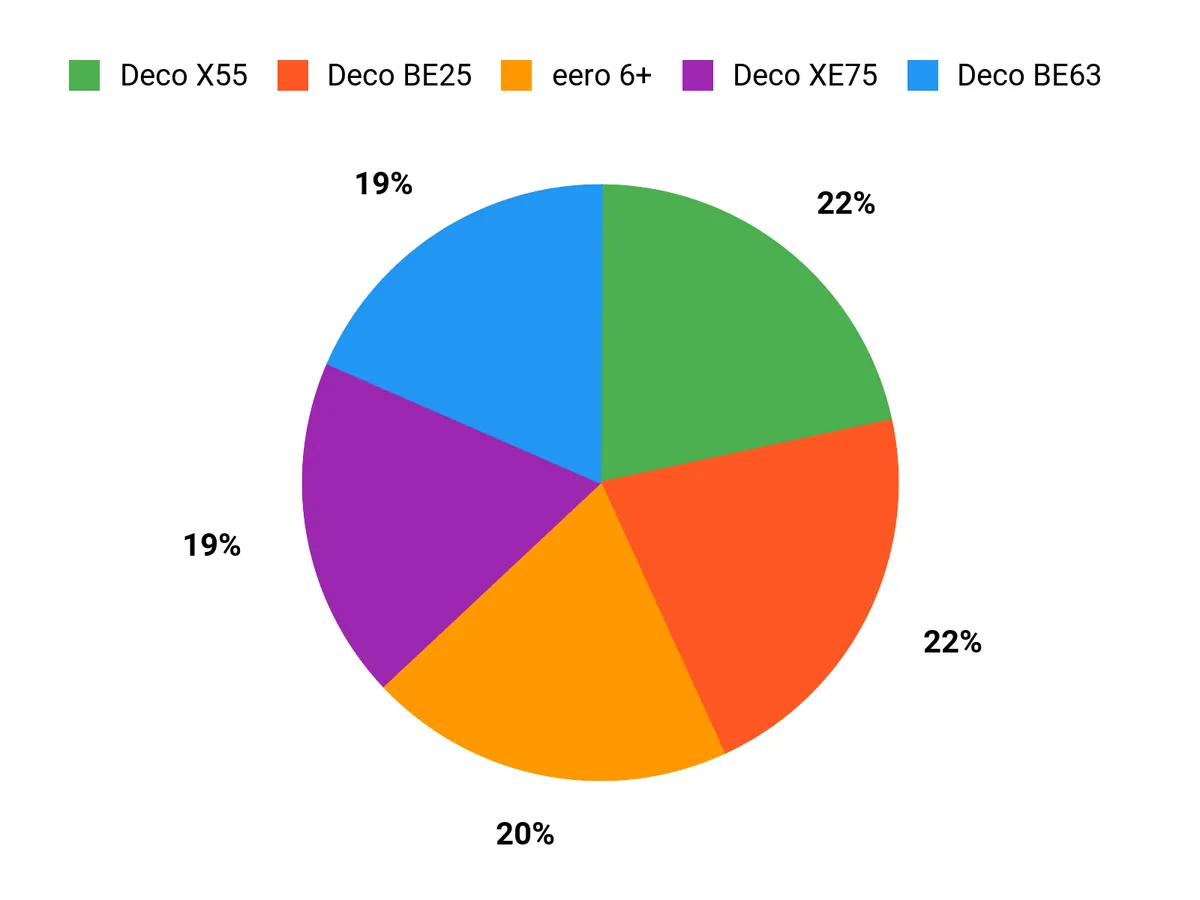
When choosing between the Deco X55, eero 7 and Deco XE75, you focus first on whether you need the 6GHz band and tri‑band backhaul for maximum throughput and futureproofing or prefer the Deco X55’s strong Wi‑Fi 6 value and simpler dual‑band reliability. You also weigh coverage and device capacity, ease of setup and ecosystem, built‑in security and parental controls, and price—opting for eero 7 or Deco XE75 for the lowest latency and latest features, or the X55 when solid performance and cost-effectiveness matter most.
Wrapping Up
Choose the right mesh system for how you use the network. If you have a 1 Gbps plan and need straightforward coverage at a great price, the Deco X55 gives a reliable balance of speed, coverage and ports. If you prioritize smart‑home integration and long support windows, the eero models are an excellent fit.
For future‑proofing with a 6 GHz band, choose the Deco XE75; for an affordable Wi‑Fi 7 entry point pick the Deco BE25; and for serious multi‑device households or pro gamers, the BE63, eero Pro 7 or ASUS ROG GT6 deliver the headroom you need. You’ll get the most benefit by matching features to your situation: maximize wired backhaul if you need rock‑solid gaming and streaming, opt for tri‑band or Wi‑Fi 6E/7 if you have many high‑bandwidth clients, and favor simple, well‑supported software if you prefer a hands‑off experience. With the right mesh system in place, you eliminate dead zones, reduce buffering, and make your home network easier to manage.
| Product | Image | Rating | Coverage Area | Max Speed | Connectivity Options | Special Highlights |
|---|---|---|---|---|---|---|
| TP-Link Deco X55 AX3000 WiFi 6 Mesh System |  | 4.4/5 (16,713 reviews) | Up to 6,500 sq. ft. | AX3000 |
|
|
| Amazon eero 7 Dual-Band Mesh Wi-Fi 7 Router |  | 4.4/5 (N/A) | Up to 6,000 sq. ft. | Up to 2.5 Gbps |
|
|
| TP-Link Deco XE75 AXE5400 Tri-Band WiFi 6E Mesh System |  | 4.3/5 (8,083 reviews) | Up to 7,200 sq. ft. | AXE5400 |
|
|
| TP-Link Deco BE25 Dual-Band WiFi 7 Mesh Wi-Fi System |  | 4.4/5 (16,713 reviews) | Up to 6,600 sq. ft. | Up to 5 Gbps |
|
|
| TP-Link Deco BE63 Tri-Band WiFi 7 Whole Home Mesh System |  | 4.3/5 (8,083 reviews) | Up to 7,600 sq. ft. | Up to 10 Gbps |
|
|
This Roundup is reader-supported. When you click through links we may earn a referral commission on qualifying purchases.