
You need reliable, private, and scalable storage in 2026 — whether you back up family photos, run a home media server, or support a small office. This guide compares six Synology NAS models so you can quickly see which unit matches your priorities: ease of use, performance and expandability, and overall value. Read on to find the NAS that helps you protect your data, simplify backups, and keep control of your files without relying on third‑party cloud subscriptions.
Top Picks
| Category | Product | Price | Score |
|---|---|---|---|
| 💰 Best Budget 2-Bay | DS223j | $194.99 | 88/100 |
| 🎯 Best for Home Office | DS223 | $274.99 | 90/100 |
| 🔰 Best Plug-and-Play | BeeStation | $219.99 | 78/100 |
| 💼 Best for Business | DS1520+ | $1,599.00 | 94/100 |
| ⭐ Best for Media Streaming | DS218 | $849.00 | 86/100 |
| 💡 Best Value Bundle | DS223j Bundle | $516.12 | 91/100 |
How We Chose
You want a NAS that fits your use case and budget. We evaluated each Synology unit based on: performance (CPU, available RAM, and real-world throughput), software ecosystem (DiskStation Manager features and mobile apps), ease of setup and daily use, expandability (drive bays, M.2/cache, RAM), reliability and backup options (RAID types, snapshot/replication), connectivity (Ethernet ports, USB, eSATA), and value for money including bundled storage where available.
Scores reflect how well each model balances those factors for its intended audience.
💰 Best Budget 2-Bay

If you’re looking for a simple, reliable way to keep your files in one safe place, the DS223j is one of those devices that quietly gets the job done. You can set it up as a private cloud for automatic phone photo backups, share folders with family or coworkers, host a small media library for streaming to a TV, or keep a local copy of important work documents.
It’s compact and whisper-quiet, so you can tuck it on a shelf without creating noise or heat headaches. For day-to-day use you’ll appreciate the web-based DiskStation Manager for browsing files, scheduling backups, and installing handy apps; for special occasions it’s great for consolidating a travel photo archive or serving up videos to guests.
If you want a low-cost, low-fuss NAS for home or a small office, this is an easy recommendation — especially when you don’t need enterprise-level power.
What People Say
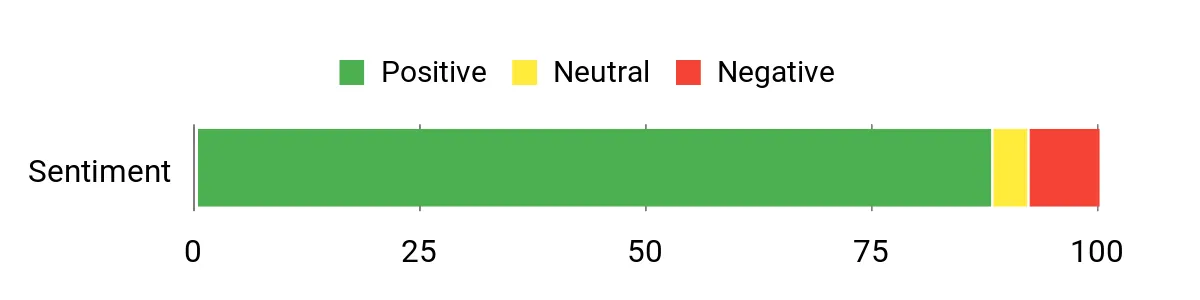
Most buyers note how straightforward the setup is and that the DSM interface makes daily tasks feel familiar. People frequently praise its quiet operation, reliable backups, and usefulness as a home media server. A common theme is that it offers strong value for the price, especially for users who want a private cloud without complexity.
Overall Sentiment: Positive
Situational Benefits
| Situation | How It Helps |
|---|---|
| Daily Phone Backups | Automatically saves your photos and frees up phone storage while keeping your data under your control. |
| Home Media Streaming | Stores movies and music centrally so you can stream to smart TVs, tablets, and phones without juggling external drives. |
| Small Office File Sharing | Provides a simple shared folder and user permissions so a few coworkers can access and back up documents. |
| Travel Photo Archive | Consolidates trip photos in one place for easy organization and long-term safekeeping. |
Ease Of Use
| Feature | Ease Level |
|---|---|
| Initial Setup | Easy |
| DiskStation Manager (web UI) | Easy |
| Mobile App Access | Easy |
| Firmware & Backup Management | Moderate |
Versatility
The DS223j covers the basics well: backups, file sharing, photo libraries and light media streaming. It’s versatile for homes and small offices, though it isn’t aimed at heavy virtualization or high-concurrency business workloads.
Compatibility
| Platform | Compatibility Level |
|---|---|
| Windows | High |
| macOS | High |
| Android | High |
| iPhone / iOS | High |
Key Benefits
- Affordable two-bay storage with private cloud features
- Easy setup and user-friendly DiskStation Manager
- Quiet, compact design that fits home environments
- Good backup and media streaming capabilities
Current Price: $194.99
Rating: 4.4 (total: 1,361+)
🎯 Best for Home Office

If you want a tidy, reliable way to centralize files at home or in a small office, the DS223 is a smart pick. You can back up phones automatically, share work folders with clients, stream a personal media library to a TV, or run light business services without fuss.
The web-based DiskStation Manager puts most tasks in a browser so you don’t need to be a network expert, and the unit itself is compact and quiet enough to sit on a shelf. For everyday use it’s great for scheduled backups, syncing documents across devices, and serving media; for special projects — like assembling a shared client folder or consolidating years of photos — it keeps everything accessible and under your control. If you need a reliable two-bay NAS that balances ease and capability for a home office, this is one you can comfortably recommend to yourself.
What People Say
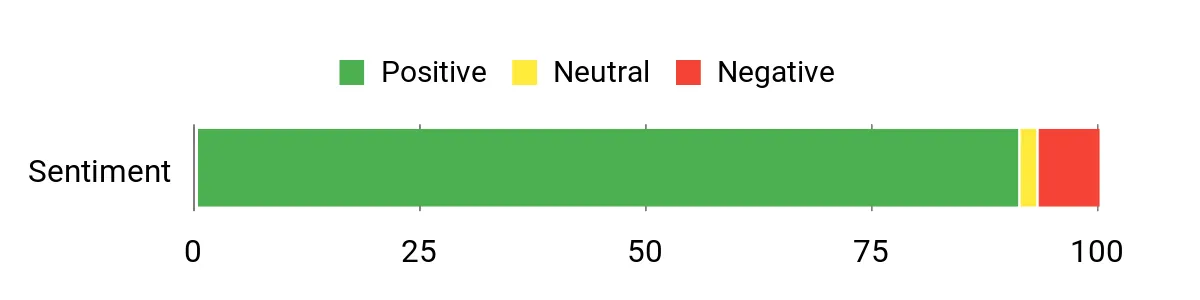
You’ll see lots of praise for how the DSM interface makes routine tasks feel familiar and manageable, and many users highlight reliable backups and smooth file sharing across Windows, macOS and mobile devices. Reviewers also like the quiet, compact design and the ability to migrate drives or reuse older drives, though people often remind you to check drive compatibility and expect a short learning curve when exploring advanced features.
Overall Sentiment: Positive
Situational Benefits
| Situation | How It Helps |
|---|---|
| Automatic Phone Backups | Keeps your photos and videos backed up off-device so you don’t lose memories and can free up phone space. |
| Home Office Document Sharing | Creates shared folders and permission controls so you and collaborators can access the same files securely. |
| Media Streaming To TV | Stores movies and music centrally so you can stream to smart TVs, media players, or mobile devices without juggling drives. |
| Temporary Project Archives | Lets you gather project files in one place for easy access during a deadline or client handoff, then archive when the work is done. |
Ease Of Use
| Feature | Ease Level |
|---|---|
| Initial Setup | Moderate |
| DiskStation Manager (web UI) | Easy |
| Mobile App Access | Easy |
| Drive Migration & RAID Setup | Moderate |
Versatility
The DS223 is flexible for homes and small offices — from phone backups and media streaming to light business file sharing and surveillance. It’s not meant for heavy virtualization or enterprise workloads, but covers most everyday and occasional advanced needs.
Compatibility
| Platform | Compatibility Level |
|---|---|
| Windows | High |
| macOS | High |
| Android | High |
| iPhone / iOS | High |
Key Benefits
- Straightforward private cloud and backup features via DSM
- Good cross-device file access and media streaming
- Compact, quiet design suited to home or small office desks
- Synology app ecosystem expands functions without extra hardware
Current Price: $274.99
Rating: 4.5 (total: 707+)
🔰 Best Plug-and-Play

If you want a no-fuss personal cloud that mostly just works, BeeStation is built for you. It arrives with a drive already installed and a QR-code setup that gets phones and computers backing up in minutes, so you don’t need to wrestle with RAID bays or server configs.
Use it day-to-day for automatic phone photo backups, desktop folder syncs, and a central spot to share albums with family. For special occasions — like gathering holiday photos from everyone or handing a client a tidy archive — it keeps things simple and accessible.
It’s friendly for nontechnical users, saves you recurring cloud fees, and plays nicely with Time Machine on macOS; just remember it’s a single-drive device, so add an extra backup if you care about redundancy. If you want easy private cloud storage without managing a full NAS, this is one you can comfortably put on a shelf and forget about until you need a file.
What People Say
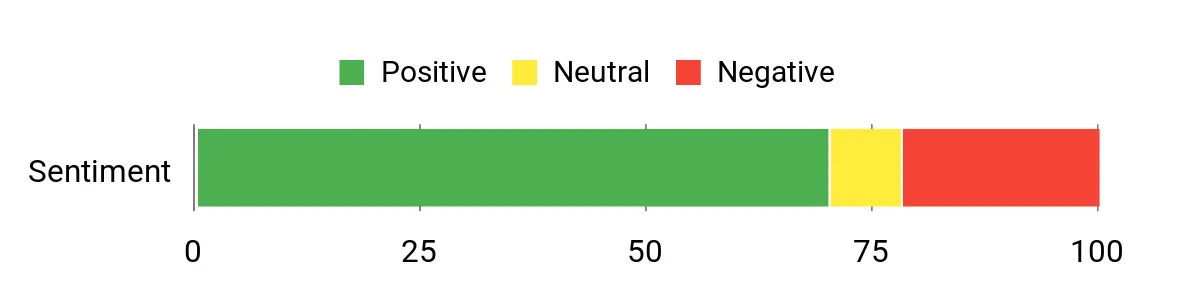
Customers frequently praise how straightforward the setup is and the convenience of the BeeFiles and BeePhotos apps for automatic backups. Many appreciate avoiding monthly cloud fees and like the simple sharing features for families.
Common gripes include the single-drive design (no built-in redundancy), occasional hiccups mapping the drive to a desktop, and room for app improvements.
Overall Sentiment: Positive
Situational Benefits
| Situation | How It Helps |
|---|---|
| Automatic Phone Backups | Keeps your photos and videos safely stored off your phone so you can free up space and avoid losing memories. |
| Family Photo Sharing | Creates individual accounts and shared albums so relatives can upload and view photos without juggling links or subscriptions. |
| Cutting Cloud Costs | Consolidates Google Drive/Dropbox backups to a local device, removing monthly fees while keeping files accessible remotely if you want. |
| Mac Backups (Time Machine) | Provides a straightforward target for Time Machine so you can keep regular Mac backups without extra configuration. |
Ease Of Use
| Feature | Ease Level |
|---|---|
| Initial Setup | Easy |
| Mobile App Backups | Easy |
| Desktop Drive Mapping | Moderate |
| Advanced NAS Features | Moderate |
Versatility
BeeStation shines as a personal cloud for photos, simple backups, and family sharing. It’s not intended to replace a multi-bay NAS for redundancy or heavy server tasks, but it covers everyday needs and occasional projects where simplicity matters.
Compatibility
| Platform | Compatibility Level |
|---|---|
| Windows | High |
| macOS | High |
| Android | High |
| iPhone / iOS | High |
Key Benefits
- Truly plug-and-play with built-in drive and QR-code setup
- Automatic phone photo backups and desktop sync via apps
- Replaces subscription cloud costs with local personal storage
- Easy sharing and per-user spaces for families
Current Price: $219.99
Rating: 3.9 (total: 212+)
💼 Best for Business

If you run a small office or need a reliable on-site server, the DS1520+ is built to handle everyday business tasks without making you feel like an IT admin. You can use it for scheduled backups, central file storage, hosting a few VMs for testing, or even as a surveillance hub for cameras.
Day to day it keeps user folders, shared archives, and automated backups tidy and accessible; for special projects like handing off archived client work or streaming 4K media to a meeting room, it’s more than capable. The M.2 cache slots and DSM software give you speed and useful extras without a steep learning curve—install drives, punch in a few settings, and you’ve got a compact server that scales as your needs grow. If you want a business-focused NAS that balances performance, expandability, and sensible features, this is a solid choice.
What People Say
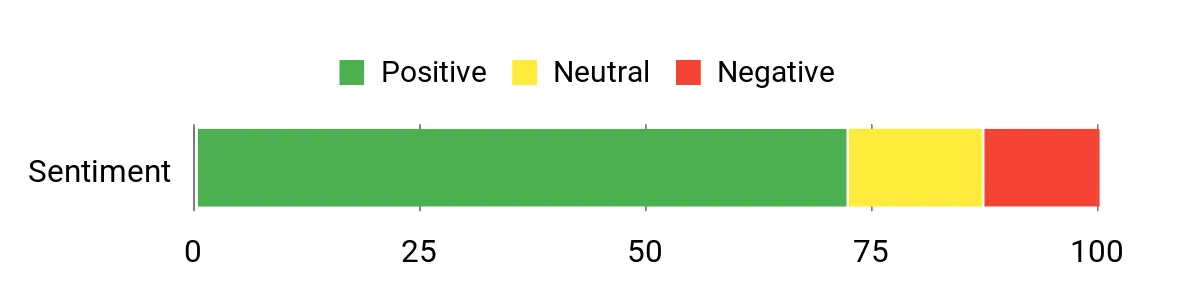
Customers commonly praise the DS1520+ for its reliable performance and the depth of Synology’s DSM software—people like how easy it is to set up shared folders, backups, and add-on apps. Many note the speed boost from using SSDs and M.2 cache, while a few mention the need to install drives and tweak settings during initial setup. Price and the 1GbE network caps pop up as occasional drawbacks, but overall users appreciate the device for small-business workloads and home labs.
Overall Sentiment: Positive
Situational Benefits
| Situation | How It Helps |
|---|---|
| Daily Backups | Automates and centralizes desktop and server backups so you can recover files quickly without juggling USB drives. |
| Virtual Test Environment | Runs lightweight VMs for testing or small services using Virtual Machine Manager, keeping experiments off your primary servers. |
| 4K Media Playback | Streams 4K content to meeting rooms or home theaters while keeping your media library organized and accessible. |
| Office Surveillance | Handles multiple IP cameras via Surveillance Station, storing footage locally with configurable retention and alerts. |
Ease Of Use
| Feature | Ease Level |
|---|---|
| Initial Setup | Moderate |
| DSM Interface | Easy |
| Hardware Upgrades (drives, RAM) | Moderate |
| Advanced Features (VMs, snapshot replication) | Advanced |
Versatility
The DS1520+ is versatile enough for backups, file sharing, light virtualization, media streaming, and surveillance. It’s aimed at small businesses and power users who need a compact, multipurpose NAS rather than an appliance limited to one task.
Compatibility
| Platform | Compatibility Level |
|---|---|
| Windows | High |
| macOS | High |
| Linux | High |
| iPhone / iOS | High |
| Android | High |
Key Benefits
- Quad-core Celeron CPU and 8GB DDR4 for responsive multitasking
- Five-bay design with 5TB SSD included for fast local storage
- Two M.2 slots for cache acceleration to boost I/O-heavy tasks
- Four 1GbE ports with Link Aggregation and failover support
- Rich DSM features: Virtual Machine Manager, snapshots, AES-256 encryption
- Surveillance Station and multimedia streaming capabilities
Current Price: $1,599.00
Rating: 4.7 (total: 348+)
⭐ Best for Media Streaming

If you want a compact NAS that makes watching and sharing media simple, the DS218 is a friendly fit. It pairs a quad-core RTD1296 CPU and 2GB of RAM with two 2TB SSDs for snappy file access and reliable 4K streaming around the house.
Use it for daily automatic backups, streaming movie nights to your TV or Plex clients, and sharing photos with family; it also doubles as a local surveillance recorder for camera footage. DSM’s app ecosystem keeps media servers, backups, and user permissions approachable, so you’ll spend less time tinkering and more time enjoying your content. For a home-focused media NAS that feels fast and easy to live with, this is a sensible choice.
What People Say
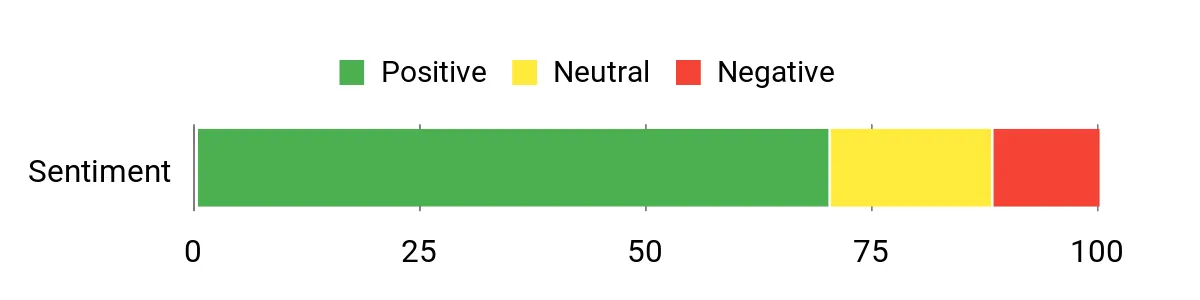
You’ll see reviewers frequently praise the DS218’s streaming performance and the speed boost from the included SSDs and RTD1296 CPU. Many people like how DSM packages multimedia, backup, and surveillance tools into a single, approachable interface.
A common note is that initial drive installation and some network setup take a bit of time, and a few users mention the 1GbE network limit when many devices stream simultaneously.
Overall Sentiment: Positive
Situational Benefits
| Situation | How It Helps |
|---|---|
| Daily Backups | Automates and centralizes desktop and device backups so you can recover files without juggling external drives. |
| Movie Night Streaming | Streams 4K content to smart TVs and media players with minimal buffering for a smooth viewing experience. |
| Home Office File Sharing | Keeps documents and project folders accessible on your local network with simple user permissions and shared folders. |
| Home Surveillance Storage | Stores camera footage locally via Surveillance Station with configurable retention and alert options. |
Ease Of Use
| Feature | Ease Level |
|---|---|
| Initial Setup | Moderate |
| DSM Interface | Easy |
| Drive Installation | Moderate |
| Media Apps (Plex, Synology Video) | Easy |
Versatility
The DS218 works well as a multimedia hub, backup target, file server, and light surveillance recorder — a solid all-in-one for families and home offices that don’t want multiple appliances.
Compatibility
| Platform | Compatibility Level |
|---|---|
| Windows | High |
| macOS | High |
| Linux | High |
| iPhone / iOS | High |
| Android | High |
Key Benefits
- RTD1296 quad-core 1.4 GHz CPU and 2GB DDR4 for smooth multimedia performance
- 4TB (2 x 2TB) SATA 2.5″ SSDs for fast local storage and quick access
- 1 x 1GbE LAN port with Link Aggregation and failover support
- DSM software with multimedia apps, backup tools, and Surveillance Station
- Multiple USB ports for external drives and quick file transfers
- Compact form factor that fits a living room or small office setup
Current Price: $849.00
Rating: 4.4 (total: 214+)
💡 Best Value Bundle

If you’re looking for an affordable, no-nonsense NAS that handles everyday backups, photo storage, and light media sharing, the DS223j bundle is a friendly pick. It pairs a 4-core Realtek RTD1619B CPU and 1 GB DDR4 with two 3 TB WD Red Plus drives in a 2-bay setup, so you get usable space out of the box without hunting for disks. Use it for automatic desktop and phone backups, Time Machine for Macs, a simple media library for local streaming, or as a compact surveillance recorder for a few cameras.
DSM keeps things approachable, so you’ll spend more time using your files than fighting settings. If your needs are mainly backup and home-file sharing, this bundle gives you a lot of practical value.
What People Say
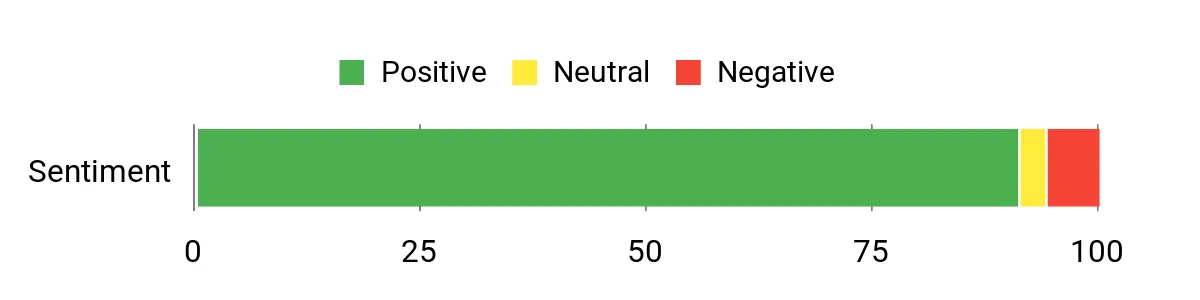
Customers commonly praise how straightforward the DS223j is to set up and how DSM brings lots of useful apps into one place. People like getting drives included—many call the bundle a great value for immediate use—and note it handles backups, media access on the local network, and light surveillance well.
A recurring caveat is its modest RAM and 1 GbE network limit, which means it isn’t ideal for heavy transcoding or demanding multi-user workloads.
Overall Sentiment: Positive
Situational Benefits
| Situation | How It Helps |
|---|---|
| Daily Backups | Automates backups from PCs, Macs, and phones so you can free up device storage and restore files when needed. |
| Home Office File Sharing | Keeps documents accessible to family or a small team with simple shared folders and user permissions. |
| Off-Site / Secondary Backup | Use it as a remote backup target or replicate important data from another NAS to protect against local failures. |
| Light Media Streaming | Hosts a library for local streaming to smart TVs and media players without needing cloud subscriptions. |
Ease Of Use
| Feature | Ease Level |
|---|---|
| Initial Setup | Moderate |
| DSM Interface | Easy |
| Drive Installation | Easy |
| App Installation (Backups, Surveillance) | Easy |
Versatility
This bundle covers core home and small-office needs — centralized backups, basic media sharing, and camera recording — making it a practical single device if you want a compact private cloud without complex setup.
Compatibility
| Platform | Compatibility Level |
|---|---|
| Windows | High |
| macOS | High |
| Linux | High |
| iPhone / iOS | High |
| Android | High |
Key Benefits
- Includes DS223j NAS plus 2 × 3 TB WD Red Plus drives (6 TB bundle) for immediate use
- Realtek RTD1619B 4-core CPU and 1 GB DDR4 for efficient basic tasks
- Synology DSM offers easy backups, file syncing, and Surveillance Station
- 1 × RJ-45 1GbE LAN port and 2 × USB 3.2 Gen 1 ports for network and external storage
- Good value for home users who want a ready-made private cloud and local backups
- Compact design that fits on a shelf or small home office desk
Current Price: $516.12
Rating: 4.6 (total: 1114+)
FAQ
How Do I Choose The Right Synology NAS For Home Or Small Business In 2026?
You should start by matching the device to your primary workload: simple photo and phone backups, media streaming, multi-user business file sharing, or surveillance. Match Device To Workload by choosing the number of bays for capacity and redundancy (2 bays for basic redundancy, 4+ bays for growth), a CPU and RAM profile that supports your apps (lightweight models like the DS223j at $194.99 are excellent for basic backups and media streaming, while more capable units such as the DS1520+ at $1,599.00 support virtualization, many simultaneous users, and SSD caching), and whether you want a ready-to-use single-drive unit like the BeeStation at $219.99 or a diskless chassis such as the DS223 at $274.99 where you pick your own NAS drives. You should also consider real-world constraints: your network speed (1 GbE will bottleneck high-speed SSDs), physical noise and power draw, and whether you need features like multiple LAN ports, M.2 cache slots, or expandability.
Finally, check the Synology compatibility list before buying drives and plan for a backup strategy rather than assuming RAID equals a complete backup.
What Should I Know About Drives, Compatibility, And Data Protection?
You must use drives intended for NAS use and consult Synology’s compatibility list before installing them because not all consumer drives behave well in long‑running RAID arrays; if you buy a bundle that includes drives (for example a 6 TB DS223j bundle at $516.12) you get a tested combination, but diskless models require you to source compatible disks. Choose between RAID levels or Synology Hybrid RAID (SHR) depending on whether you want easier expansion with mixed drive sizes; remember RAID/SHR protects against drive failure but is not a backup. Implement a 3‑2‑1 backup mindset: keep copies locally, on different media, and offsite or in a separate cloud. Use Snapshots, Hyper Backup and test restores regularly so you know your recovery works.
If you rely on a single-drive product like BeeStation, accept that you have no redundancy and pair it with an external backup or offsite sync.
How Do I Optimize Performance, Remote Access, And Security Without Exposing My Data?
You optimize performance by eliminating network and storage bottlenecks: ensure your switch and cabling support the speeds you expect, consider link aggregation or upgrading to 2.5/10 GbE for higher throughput, and use SSD caching only on models that support it (for example, DS1520+ supports cache acceleration). For remote access, prefer a VPN to direct port forwarding; Synology QuickConnect is convenient but understand its tradeoffs.
Harden security by enabling 2‑Factor Authentication, automatic DSM updates, the built‑in firewall, and account permission best practices. Disable unnecessary services and put surveillance or public shares behind network controls. Finally, monitor SMART data and set up email/SMS alerts so you catch problems early, and always verify your backup and restore procedures rather than assuming backups are successful.
Buyer Preferences
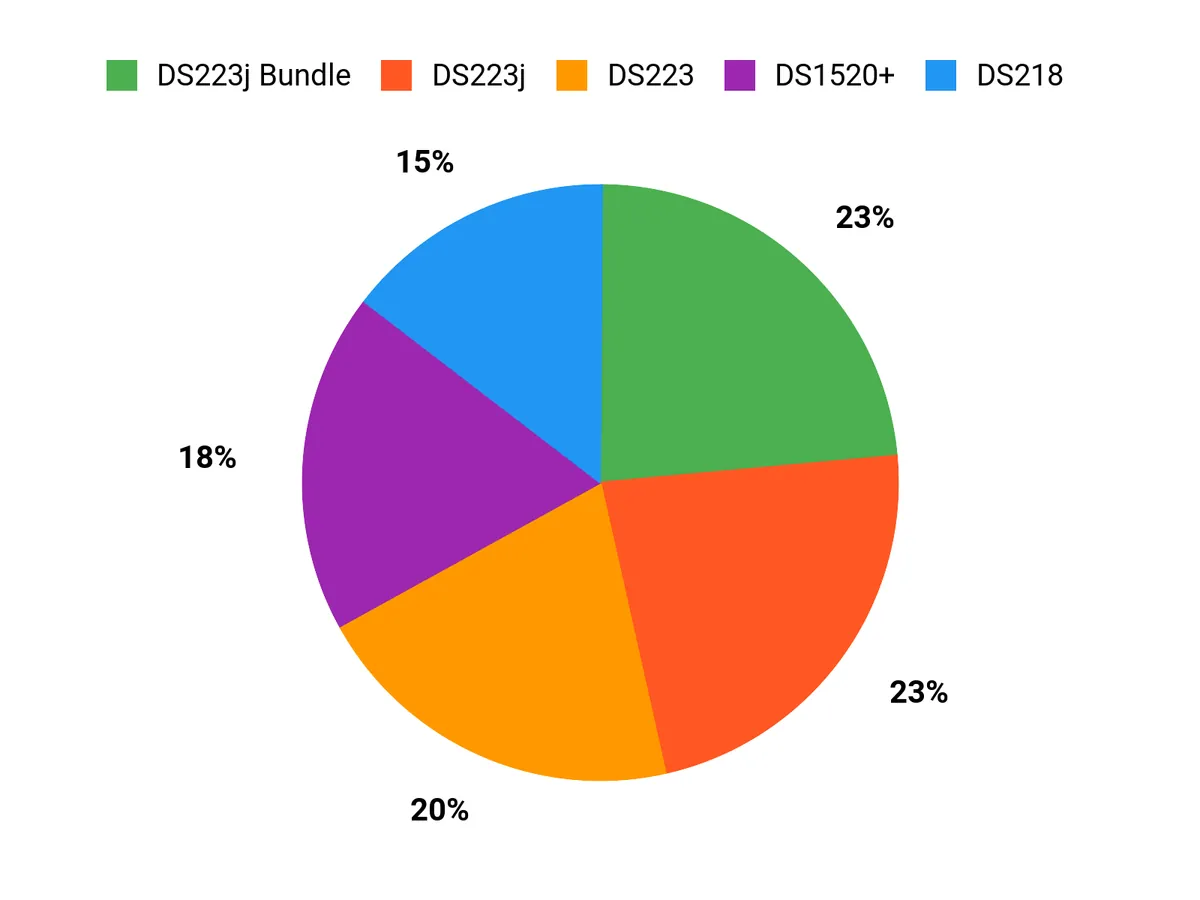
When choosing between the DS223j, DS223 and BeeStation you typically prioritize a balance of budget and power efficiency versus performance, feature set and expandability. You opt for the DS223j when you need the most affordable, low-power unit for basic backups and media streaming, the DS223 when you want higher throughput, richer apps and stronger data-protection features, and the BeeStation when raw performance, customization and upgrade potential are your top priorities.
Wrapping Up
Choose the Synology NAS that aligns with how you work and store data. If you want a compact, quiet, and affordable 2‑bay unit for basic local backups and photo sync, the DS223j gives you the essentials at a low price. If you need a bit more memory and business features for collaboration and remote access, the DS223 is the better 2‑bay option.
For a truly hands‑off personal cloud with an included drive, BeeStation is the easiest pick if you prioritise simplicity over expandability. If your priority is performance, advanced services, and expandability for a small business, the DS1520+ delivers the most headroom and features. For streaming and media tasks, the DS218 balances media capabilities with solid storage. Finally, if you want a ready‑to‑use package that includes drives, the DS223j Bundle gives strong out‑of‑box value.
Match the model to your needs — whether that’s lowest cost, easiest setup, bundled value, or headroom for business growth — and you’ll have a private, reliable storage platform under your control.
| Product | Image | Rating | Storage Capacity | Processor | RAM | Price |
|---|---|---|---|---|---|---|
| Synology 2-Bay DiskStation DS223j (Diskless) |  | 4.4/5 (1,361 reviews) | N/A (diskless) | Realtek RTD1619B 4-Core 1.7 GHz | 1GB DDR4 | $194.99 |
| Synology 2-Bay NAS DS223 (Diskless) |  | 4.5/5 (707 reviews) | N/A (diskless) | N/A (Has various configurations) | 2GB DDR4 | $274.99 |
| Synology BeeStation 4TB Personal Cloud Storage Device |  | 3.9/5 (212 reviews) | 4TB Built-in | N/A | N/A | $219.99 |
| Synology DiskStation DS1520+ NAS Server for Business |  | N/A | 5TB (5 x 1TB SSDs) | Celeron J4125 Quad-Core 2.0GHz | 8GB DDR4 | $1,599.00 |
| Synology DiskStation DS218 NAS Server | 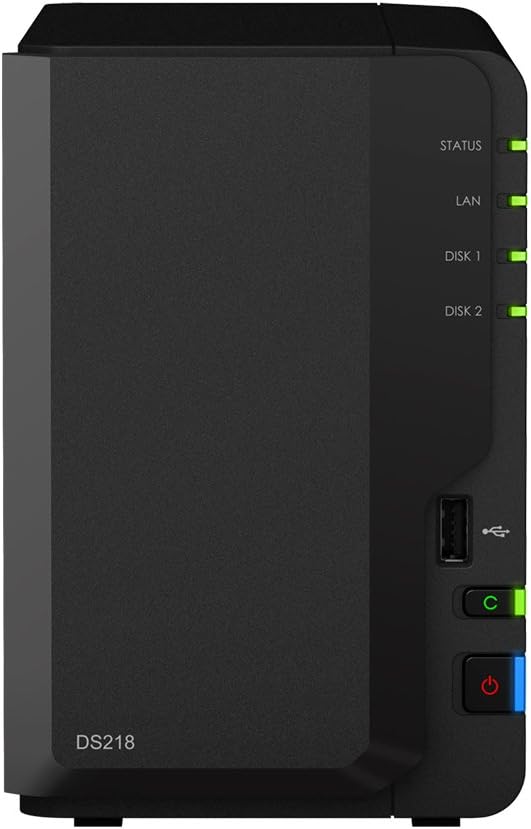 | N/A | 4TB (2 x 2TB SATA SSDs) | RTD1296 4-Core 1.4GHz | 2GB DDR4 | $849.00 |
| Synology DS223j 2-Bay Diskstation NAS (6TB Bundle) |  | 4.6/5 (1,114 reviews) | 6TB (2 x 3TB WD Red Plus) | Realtek RTD1619B 4-Core 1.7 GHz | 1GB DDR4 | $516.12 |
This Roundup is reader-supported. When you click through links we may earn a referral commission on qualifying purchases.